Git commands every QA automation engineer should know
41 commands, grouped by when you need them: testing a PR, finding the commit that broke a test, undoing a bad reset. Each section shows real output.
login.spec.ts has an unsaved edit. Click a lit command to move it to the next box.
edit the file You changed the file. Git sees it, but nothing is saved yet.
git add The change is staged: it goes into the next commit.
git restore --staged Unstaged. The edit is still in your file.
git commit Saved as a commit, on your machine only. CI can't see it yet.
git reset --soft HEAD~1 The commit is undone, the change is staged again. Fine before you push.
git push Published. CI starts, the team can pull it.
git restore The edit is thrown away. Git has no copy of it, so it is gone for good.
Pick your situation
Start with 1 and 2 if Git is new to you. The rest you’ll need the day something breaks.
- 1Get the code, stay in sync7 commands
- 2Save and share your tests6 commands
- 3Test someone else’s branch5 commands
- 4Find who changed what, and when5 commands
- 5Find the commit that broke the test4 commands
- 6Undo almost anything6 commands
- 7Switch tasks without losing work4 commands
- 8Get a clean environment4 commands
no tag: nothing is lostrewrites history: fine before you pushcan’t be undone: read twice
I need to…
Type what you’re trying to do. Each answer links to its section.
22 matches
- See what I changed
git status -sb§1 - Throw away my local edits
git restore <file>§6 - Get a deleted branch back
git reflog, then git switch -c <name> <sha>§6 - Start a branch for a new test
git switch -c test/<name>§1 - Update my branch with the latest main
git pull --rebase origin main§1 - Commit only part of a file
git add -p§2 - Add a forgotten file to the last commit
git commit --amend --no-edit§2 - Push after a rebase without breaking a teammate
git push --force-with-lease --force-if-includes§2 - Check out a developer's PR
git fetch origin pull/123/head:pr-123§3 - Run only the tests a PR changed
git diff --name-only main...HEAD -- '*.spec.ts'§3 - Run two branches at the same time
git worktree add ../pr-123 pr-123§3 - Find when a selector was removed
git log -S"text" --oneline§4 - Find who wrote this line
git blame -w -C -L <from>,<to> <file>§4 - Find which commit broke a test
git bisect run <test command>§5 - Unstage a file
git restore --staged <file>§6 - Undo my last commit
git reset --soft HEAD~1§6 - Revert a commit that's already pushed
git revert <sha>§6 - Recover after reset --hard
git reflog§6 - Park my work and switch branches
git stash push -u -m "wip"§7 - Copy a test fix to the release branch
git cherry-pick -x <sha>§7 - Delete old reports and temp files
git clean -n -d, then git clean -fd§8 - Find out why a file is ignored
git check-ignore -v <path>§8
Get the code, stay in sync
WhenFirst day on the project, or every morning before you run the suite.
git clone <url>Download the repo with its full history.
git status -sbWhich branch you are on and what changed. Run it before every other command.
git switch <branch>Move to an existing branch.
git switch -c test/login-flakyCreate a branch and move to it.
git switch -Jump back to the branch you were on before.
git fetch --pruneDownload new commits and drop branches deleted on the server. Touches none of your files.
git pull --rebaseFetch, then put your local commits on top. No noisy merge commits in your test branch.
What you’ll see
$ git status -sb## test/login-flaky M notes.txt # changed, not stagedM src.js # staged, goes into the next commit?? debug.log # new file Git doesn't track yetTipStill typing git checkout for everything? It works, but one command does two jobs. git switch changes branches, git restore changes files, and neither can surprise you with the other's job. Both are stable since Git 2.51.
Save and share your tests
WhenYou fixed a locator, added a spec, or updated a fixture.
git add -pPick changes hunk by hunk. Leaves your console.log and test.only behind.
git add tests/Stage everything under a folder.
git commit -m "test: cover expired token"Save the staged changes as one commit.
git commit --amend --no-editAdd forgotten changes to the last commit. Only before you push. rewrites history
git push -u origin HEADPublish the current branch under the same name and remember it.
git push --force-with-lease --force-if-includesOverwrite your branch after an amend or rebase, but refuse if someone else pushed to it. rewrites history
What you’ll see
# a teammate pushed to your branch while you amended$ git push --force-with-lease --force-if-includes ! [rejected] test/login-flaky -> test/login-flaky (remote ref updated since checkout)error: failed to push some refshint: Updates were rejected because the tip of the remote-tracking branch hashint: been updated since the last checkout. # plain --force would have deleted their commit$ git pull --rebase && git push --force-with-lease --force-if-includesTipUse --force-if-includes together with --force-with-lease. On its own, the lease is defeated by a background fetch, for example the one your IDE runs every few minutes.
Test someone else’s branch
WhenA developer asks you to check their PR before it merges.
git fetch origin pull/123/head:pr-123Download GitHub PR #123 as a local branch pr-123 (gh pr checkout 123 does the same).
git diff --stat main...HEADWhich files the branch changed since it left main, and how much.
git diff --name-only main...HEAD -- '*.spec.ts'Only the changed test files. Feed the list to your runner.
git worktree add ../pr-123 pr-123Check the PR out in a second folder. Your own branch stays untouched.
git worktree remove ../pr-123Delete that folder when you are done.
What you’ll see
$ git diff --stat main...test/login-flaky tests/check.sh | 1 + tests/login.spec.ts | 1 + 2 files changed, 2 insertions(+) # run main and the PR side by side, in two terminals$ git worktree add ../pr-123 pr-123$ cd ../pr-123 && npm ci && npx playwright testTipThree dots (main...HEAD) compare against the point where the branch split off, so you see only the PR's changes. Two dots also show everything that landed on main since then. Playwright can do the selection itself: npx playwright test --only-changed=origin/main.
Find who changed what, and when
WhenA locator stopped matching, or a test suddenly has a new timeout.
git log --oneline --graph -20The last 20 commits as a compact tree.
git log -p --follow -- tests/login.spec.tsEvery change to one file, with diffs, even across renames.
git log -S"getByTestId('login')" --onelineCommits that added or removed this exact text. The fastest way to find when a selector appeared or vanished.
git blame -w -C -L 10,30 tests/login.spec.tsWho last touched lines 10–30, ignoring whitespace and code moved from other files.
git show <sha> --statWhat one commit changed.
What you’ll see
$ git log -S"getByTestId('login')" --oneline -- tests/04b923d test: role locator # removed itdfcae02 test: login # added itTip-S finds commits where the number of matches changed. Need every commit that touched lines matching a pattern? Use -G<regex> instead.
Find the commit that broke the test
WhenThe test passed last week. 200 commits later it fails, and nobody knows why.
git bisect start <bad> <good>Start a binary search between a failing commit and a passing one.
git bisect run npx playwright test checkout.spec.tsLet Git run the test on each step. Exit code 0 = good, 1–127 = bad, 125 = skip this commit.
git bisect good / git bisect badMark a step by hand when the check can't be scripted.
git bisect resetStop and go back to where you started.
- 1good
- 2not tested
- 3not tested
- 4not tested
- 5not tested
- 6not tested
- 7not tested
- 8not tested
- 9not tested
- 10not tested
- 11not tested
- 12not tested
- 13not tested
- 14not tested
- 15not tested
- 16bad
$ git bisect start c16 c1
step 1 · test c8 → passes (good)
step 2 · test c12 → fails (bad)
step 3 · test c10 → passes (good)
step 4 · test c11 → fails (bad)
c11 is the first bad commit
What you’ll see
# a 16-commit demo repo; in yours, the command is your test:# git bisect run npx playwright test checkout.spec.ts$ git bisect start HEAD HEAD~15$ git bisect run sh -c 'grep -q 42 src.js'running 'sh' '-c' 'grep -q 42 src.js'...41879dbeda4d2b065ce5ffc34b18add79409be27 is the first bad commit feat: change 11 src.js | 2 +-bisect found first bad commit$ git bisect resetTipIf the test file is newer than the good commit, old checkouts won't have it. Copy it outside the repo and copy it back in a small script. In that script, make setup failures exit 125 (npm ci || exit 125), or a broken install counts as a bad commit. Git 2.56 added --reset-when-found to return you to the start automatically.
Undo almost anything
WhenWrong file staged, bad commit, or a reset you regret.
git restore --staged <file>Unstage a file. The edits stay.
git restore <file>Throw away uncommitted edits in a file. They are gone for good. can’t be undone
git reset --soft HEAD~1Undo the last commit, keep its changes staged. Only if not pushed. rewrites history
git revert <sha>Add a new commit that undoes an old one. The safe undo on a shared branch.
git reflogEvery place HEAD has been. Your safety net after a reset or a lost branch.
git reset --hard HEAD@{1}Jump back to the state before your last move. Uncommitted edits are lost. can’t be undone
git restore --staged <file>The file leaves the next commit. Your edits stay.
git restore <file>Uncommitted edits are deleted with no way back. Stash them first if unsure: git stash push -m "maybe".
git commit --amend -m "test: fix login locator"Rewrites the last commit. Not pushed yet: just do it. Already pushed: you'll need --force-with-lease.
git reset --soft HEAD~1The commit disappears, its changes wait in staging. Only for commits you haven't pushed.
git revert <sha>Adds a new commit that reverses the bad one. History stays intact, nobody's branch breaks.
git reflog → git reset --hard HEAD@{1}The reflog lists every state HEAD was in. Pick the line before the mistake.
git reflog → git switch -c <name> <sha>Find the branch's last commit in the reflog and create the branch again on it.
What you’ll see
$ git reset --hard HEAD~1 # oops$ git reflog -3dfcae02 HEAD@{0}: reset: moving to HEAD~104b923d HEAD@{1}: commit: test: role locatordfcae02 HEAD@{2}: commit: test: login$ git reset --hard HEAD@{1} # the commit is backTipAnything you committed stays findable in the reflog for at least 30 days (90 for commits still on a branch). Edits you never committed or stashed can't. When in doubt, commit or stash first.
Switch tasks without losing work
WhenHalfway through a test, an urgent bug needs a check on another branch.
git stash push -u -m "wip: login debug"Put away all changes, new files included, with a name you'll recognise.
git stash listSee what you've put away.
git stash popBring the latest stash back and remove it from the list.
git cherry-pick -x <sha>Copy one commit, say a test fix, onto the release branch. -x notes where it came from.
What you’ll see
$ git stash push -u -m "wip: login debug"Saved working directory and index state On test/login-flaky: wip: login debug$ git switch release/2.4$ git cherry-pick -x 04b923d$ git switch - && git stash popTipWithout -u, new files such as a fresh spec stay behind and follow you to the next branch.
Get a clean environment
WhenThe suite fails locally, passes in CI, and you suspect old reports or stale files.
git clean -n -dDry run: list untracked files and folders that would be deleted.
git clean -fdDelete untracked files and folders. Ignored files stay. can’t be undone
git clean -fdxAlso delete ignored files: node_modules, .env, .auth, reports. Closest to a fresh clone. can’t be undone
git check-ignore -v <path>Which .gitignore line ignores this file, and where it is.
What you’ll see
$ git clean -n -dWould remove debug.logWould remove playwright-report/Would remove test-results/TipAlways run -n first. -x also deletes .env and saved logins, which nothing can restore.
Old habits worth dropping
Most tutorials still teach the left column. It works, and it’s how people lose work.
git checkout <branch>git switch <branch>One command, one job. checkout also overwrites files when you mistype a name.
git checkout -- <file>git restore <file>Same result, and the name says it out loud: these edits are about to go.
git push --forcegit push --force-with-lease --force-if-includesRefuses if someone pushed while you weren't looking.
git reset --hard as a reflexgit stash, then resetA stash can be popped back. Uncommitted work wiped by reset can't.
Assuming the branch is mastermainGitHub, GitLab and Bitbucket default to main, and Git 3.0 will too.
Set up once
A .gitignore for a test repo, and seven settings that make the commands above safer by default.
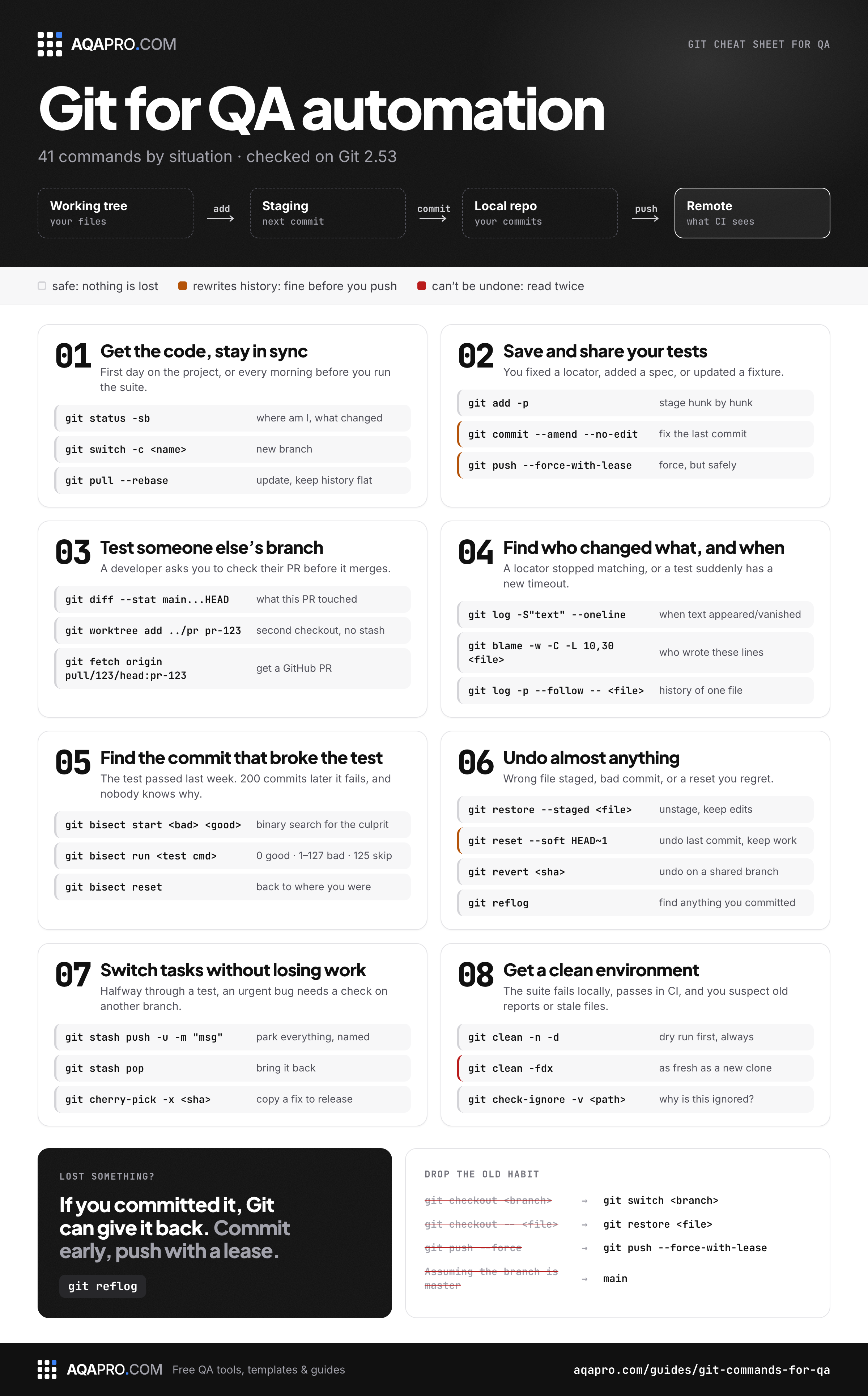
# Playwright/test-results//playwright-report//blob-report//playwright/.cache/# saved logins: never commit them/playwright/.auth/ # Allure, Cypress, coverage/allure-results//allure-report//cypress/videos//cypress/screenshots//coverage/ # Secrets and local noise.env.env.*!.env.examplenode_modules/.DS_Storegit config --global pull.rebase true # pull never creates merge bubblesgit config --global rebase.autoStash true # rebase with uncommitted editsgit config --global push.autoSetupRemote true # first push needs no -ugit config --global push.useForceIfIncludes true # safer --force-with-leasegit config --global fetch.prune true # drop deleted remote branchesgit config --global init.defaultBranch maingit config --global alias.lg "log --oneline --graph --decorate -20"If you committed it, Git can give it back.
Commit early, push with a lease, and the reflog keeps the rest.
Download the poster
All eight groups on one sheet, with what each command does. Free PNG, print it or pin it in your team chat.
FAQ
What Git commands does a QA engineer need?
Daily: git status, git switch, git pull --rebase, git add -p, git commit and git push. For testing PRs: git fetch, git diff --stat main...HEAD and git worktree. For investigations: git log -S, git blame and git bisect run. For mistakes: git restore, git revert and git reflog. That covers almost everything a test automation engineer runs.
What is the difference between git switch and git checkout?
git checkout does two jobs: it changes branches and it overwrites files. git switch only changes branches and git restore only restores files, so a typo can't make one do the other's job. They were added in Git 2.23 and are no longer marked experimental since Git 2.51. git checkout still works.
How do I find which commit broke a test?
Use git bisect. Run git bisect start <bad> <good>, then git bisect run followed by your test command, for example npx playwright test checkout.spec.ts. Git checks out the middle commit, runs the test and halves the range until it prints the first bad commit. 16 commits take 4 runs, 1,000 take about 10. Finish with git bisect reset.
How do I undo git reset --hard?
Run git reflog. It lists every commit HEAD pointed to, including the ones a reset left behind. Find the line from before the reset and run git reset --hard HEAD@{n} with that number. This only brings back committed work: edits you never committed or stashed are lost.
Is git push --force safe?
No. It overwrites the remote branch even if a teammate pushed in the meantime, and their commits disappear. git push --force-with-lease --force-if-includes refuses in that case and reports the push as rejected ('stale info' or 'remote ref updated since checkout'). Pull, rebase and push again.
What should a test automation repo put in .gitignore?
Test output and secrets: test-results/, playwright-report/, blob-report/, playwright/.auth/ (saved logins), allure-results/, Cypress videos and screenshots, coverage/, .env files and node_modules/. Check a single path with git check-ignore -v <path>.