How to fix flaky Playwright tests
A flaky test passes and fails on the same code. Almost every time, the test is guessing: how long to wait, which element to click, what another test left behind. Seven fixes that replace the guesses, each with the error you’ll recognise.
- #1passpass
- #2passpass
- #3passpass
- #4failpass
- #5passpass
- #6passpass
- #7failpass
- #8passpass
2 of 8 failed · 40.0 s spent waiting. Runs 4 and 7 needed more than 5 s; the others waited for nothing.
0 of 8 failed · 40.0 s. Each run moves on the moment the button is ready.
Seven fixes, one idea: stop guessing
- 1Delete every sleepLet Playwright wait for the element. Never wait for the clock.
- 2Use locators, not element handlesStore how to find the element, not the element itself.
- 3Wait for the response you needStart listening before the click, await after it.
- 4Use web-first assertionsexpect(locator).toBe…() retries. expect(await …) checks once.
- 5Record a trace of the failureA red build without a trace is a guess.
- 6Give every worker its own dataTests that run in parallel must not touch the same record.
- 7Use retries to find flakes, not hide themA test that passes on retry is flaky. Treat it as a bug.
- Not sure which one?Start from the error message in your report.
Start from your error
Paste a line from the report, or pick the one that looks like yours.
9 matches
element is not attached to the DOMYou kept an ElementHandle across a re-render. Use a locator.Fix 2<div class="overlay"> intercepts pointer eventsSomething covers the element. Wait for the overlay to go away (expect(overlay).toBeHidden()); don't add force: true.Fix 1Timeout 5000ms exceeded while waiting for expect(locator).toBeVisible()The assertion did retry for 5 s. Open the trace and see what the page showed instead.Fix 4expect(received).toBe(expected) — Expected: true, Received: falseA one-time check of a value that changes. Switch to a web-first assertion.Fix 4Timeout waiting for event "response"The listener started after the request. Call waitForResponse before the click.Fix 3- Passes alone, fails when the whole suite runsTwo tests share data. Give each worker its own account; create what you change.Fix 6
- Passes locally, fails only in CISlower machine, more workers, other timezone. Get a trace from CI before changing anything.Fix 5
- Report says flaky, build is greenRetries hid a failure. Turn on failOnFlakyTests and fix the root cause.Fix 7
strict mode violation: locator resolved to 2 elementsThe locator is ambiguous. Narrow it by role and name, or scope it to a parent.Fix 2
Fix 1: Delete every sleep
Let Playwright wait for the element. Never wait for the clock.
You seePasses on your laptop, fails in CI. Or passes, but the suite takes forever.
A sleep guesses how long the app needs. On a slow CI runner the guess is too short and the test fails; on a fast laptop it's too long and you wait for nothing. Playwright already waits before every action until the element is ready, so the sleep adds nothing but risk. force: true is the same mistake: it skips the checks and clicks through a spinner or a modal that a real user couldn't click through.
- Visiblehas a size and isn't visibility: hiddenchecked
- Stablestopped moving: same box for two animation frameschecked
- Receives eventsnothing covers it: no spinner, modal or cookie banner on topchecked
- Enablednot disabledchecked
- Editableenabled and not readonlynot checked
click() waits until all lit checks pass, up to the action timeout. force: true skips the non-essential ones, including “Receives events”.
Flaky
await page.waitForTimeout(5000); // guess: 5 s is enough?await page.click('#submit', { force: true }); // click through the overlayStable
// click() waits until the button is visible, stable,// enabled and not covered by anythingawait page.getByRole('button', { name: 'Place order' }).click();await expect(page.getByText('Order confirmed')).toBeVisible();Fix 2: Use locators, not element handles
Store how to find the element, not the element itself.
You seeError: element is not attached to the DOM.
page.$() returns an ElementHandle: a pointer to one DOM node. React, Vue or Angular re-render the form, the old node is thrown away and the pointer now points at nothing. A locator is a query. Every time you use it, Playwright finds the element again in the current page. The docs mark ElementHandle as discouraged.
await page.$('#save')ElementHandlepoints at node #1page.getByRole('button', …)Locatorfinds node #1Flaky
const save = await page.$('#save'); // one DOM nodeawait page.getByLabel('Name').fill('Ada'); // the form re-rendersawait save.click(); // Error: element is not attached to the DOMStable
const save = page.getByRole('button', { name: 'Save' }); // a queryawait page.getByLabel('Name').fill('Ada');await save.click(); // finds the current button right nowFix 3: Wait for the response you need
Start listening before the click, await after it.
You seewaitForResponse times out, but the request is right there in the trace.
The request goes out the moment you click. If you only start waiting after the click, a fast server has already answered and you wait for a response that already came and went. Register the wait first, then click, then await it. And if the page shows the result, asserting what the user sees is usually enough.
Missed. The response arrived while the test was still finishing click(). The listener starts later and waits for a response that will never come again.
Caught. The listener is already running when the request goes out, so it catches the response however fast the server is.
Flaky
await page.getByRole('button', { name: 'Save' }).click();// too late: the response may have already arrivedawait page.waitForResponse('**/api/user');Stable
const saved = page.waitForResponse('**/api/user'); // 1. listenawait page.getByRole('button', { name: 'Save' }).click(); // 2. actconst res = await saved; // 3. awaitexpect(res.ok()).toBeTruthy();await expect(page.getByText('Profile saved')).toBeVisible();Fix 4: Use web-first assertions
expect(locator).toBe…() retries. expect(await …) checks once.
You seeexpect(received).toBe(true), received false. A second later it would have been true.
await locator.isEnabled() reads the value once, right now, and hands a plain boolean to expect. If the button turns on 300 ms later, the test has already failed. await expect(locator).toBeEnabled() keeps checking until the condition holds or the timeout runs out (5 s by default).
expect(await pay.isEnabled())fails at 0 sawait expect(pay).toBeEnabled()passes at 1.85 sFlaky
expect(await page.getByRole('button', { name: 'Pay' }).isEnabled()).toBe(true);expect(await page.locator('.cart-row').count()).toBe(3);Stable
await expect(page.getByRole('button', { name: 'Pay' })).toBeEnabled();await expect(page.locator('.cart-row')).toHaveCount(3);Fix 5: Record a trace of the failure
A red build without a trace is a guess.
You seeCI is red, all you have is a stack trace, and the test passes locally.
A trace is a recording of the run: every action, a DOM snapshot before and after it, network calls, console logs. Open it with npx playwright show-trace and you see what the page looked like when the test failed. on-first-retry is cheap, but it records the retry, so if the retry passes you see a passing run. For flaky tests, retain-on-failure-and-retries keeps both the failing and the passing attempt, so you can compare them.
You get the retry, which passed. Cheap, but for a flaky test it can show a run with nothing wrong in it.
Records every attempt, keeps only the failed one. Good evidence, costs a recording on every run.
Records the first attempt only and keeps it if it failed. Retries run without a trace.
Keeps the failed attempt and the retry. Open both and compare: the difference is your bug. Playwright 1.59+.
Flaky
use: { trace: 'off', // red build, no evidence},Stable
use: { trace: 'retain-on-failure-and-retries', // 1.59+; or 'on-first-retry' screenshot: 'only-on-failure', video: 'retain-on-failure',},Fix 6: Give every worker its own data
Tests that run in parallel must not touch the same record.
You seePasses alone, fails with the rest. Fails more with more workers.
Logging in is not the problem: sharing one saved session (storageState) is fine while tests only read. The trouble starts when two parallel tests change the same account. One test empties the cart while another is checking it has three items. Give each parallel worker its own account, and let tests that change data create their own: a fresh order, a unique email, a new user via the API.
- worker 1empties the cart
admin@test.devpass - worker 2adds a mug
admin@test.devpass - worker 3expects 0 items
admin@test.devfail - worker 4checks out
admin@test.devfail
Each worker logs in once as its own user. Same tests, same order, nothing to collide on.
Flaky
// every worker shares one user and one carttest.use({ storageState: '.auth/admin.json' });test('cart is empty', async ({ page }) => { // worker 2 just added an item to the same cart await expect(page.getByTestId('cart-count')).toHaveText('0');});Stable
export const test = base.extend<{}, { account: Account }>({ // one account per parallel worker, created once account: [async ({}, use) => { const i = test.info().parallelIndex; await use(await createUser(`qa-${i}-${Date.now()}@test.dev`)); }, { scope: 'worker' }],});Fix 7: Use retries to find flakes, not hide them
A test that passes on retry is flaky. Treat it as a bug.
You seeGreen build, but the report says “flaky: 7”. Nobody looks.
With retries, a test that fails and then passes is reported as flaky, not passed. Most teams never read that line, so the flake stays forever. failOnFlakyTests turns the build red when that happens: the retry still runs, it still records a trace, but the problem can't hide. Raise timeouts for one slow assertion, not for the whole suite.
Three tests failed first and passed on retry. The build is green, and nobody reads the word “flaky”.
Flaky
export default defineConfig({ retries: 5, // green, eventually expect: { timeout: 30_000 }, // every check waits 30 s});Stable
export default defineConfig({ fullyParallel: true, forbidOnly: !!process.env.CI, retries: process.env.CI ? 2 : 0, failOnFlakyTests: !!process.env.CI, // 1.52+ workers: process.env.CI ? '50%' : undefined,});Four more causes worth checking
Less common than the seven, and just as hard to spot without a trace.
Time and timezones
“Today”, countdowns and session timeouts depend on the machine clock. Freeze it, and pin the timezone and locale in the config.
await page.clock.setFixedTime('2026-10-17T10:00:00'); // playwright.config.tsuse: { timezoneId: 'Europe/Berlin', locale: 'en-US' },Services you don't control
A payment sandbox or a maps API can be slow or down. Mock it with page.route() and test your side only.
await page.route('**/maps.example/**', (route) => route.fulfill({ json: { lat: 52.52, lng: 13.4 } }),);Tests that depend on order
A test passes only because another one ran first and left data behind. Shuffle the order (1.64+) and replay a failing seed.
npx playwright test --shuffle # prints the seednpx playwright test --shuffle 271828 # replay itReproduce it before you fix it
Run the suspect test many times in parallel. If it never fails, your fix proves nothing.
npx playwright test cart.spec.ts \ --repeat-each=30 --workers=4A retry is a debugging tool, not a fix.
Find the cause, then delete the guess.
Download the poster
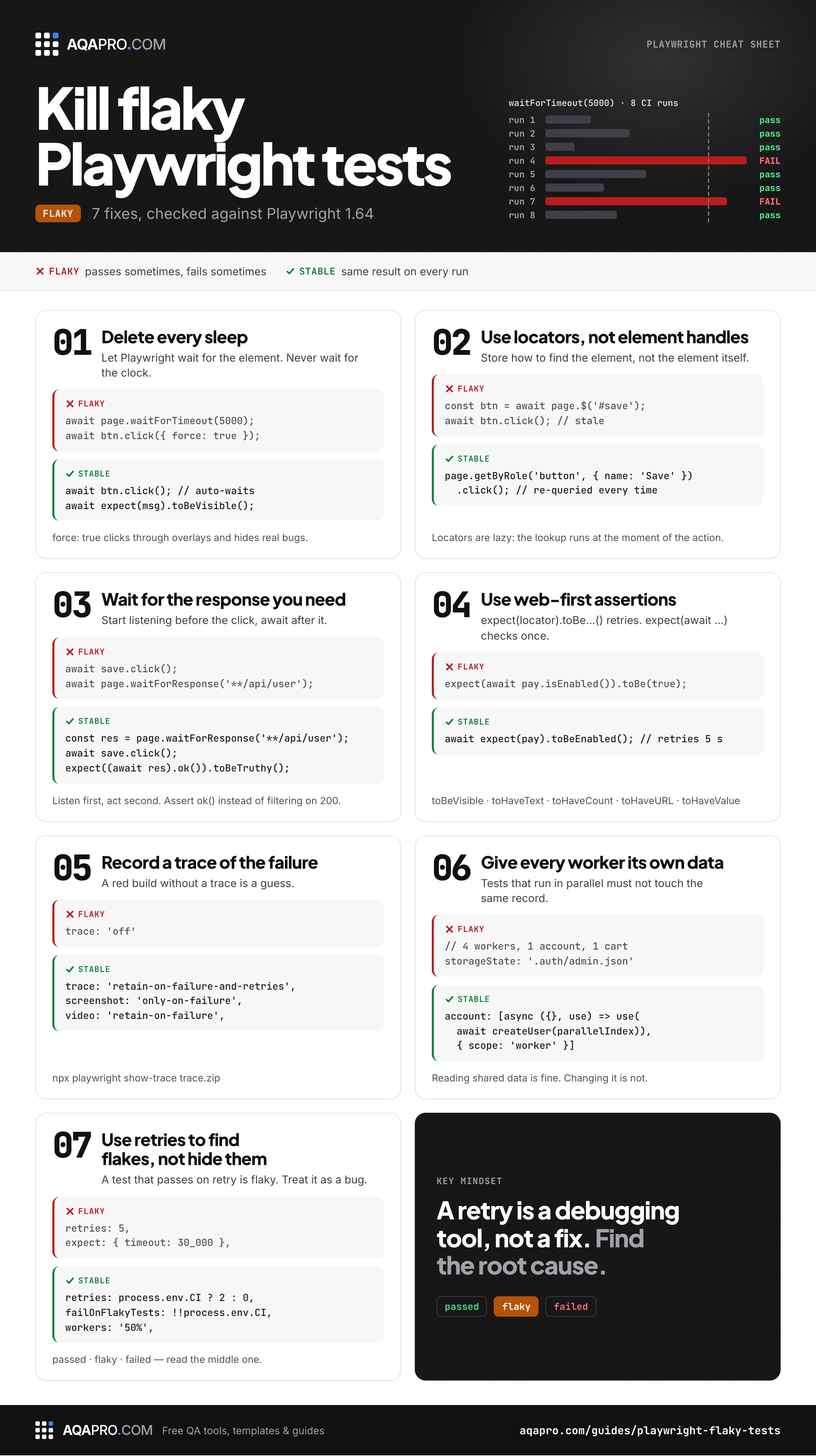
All seven fixes on one sheet: the flaky line, the stable line and the rule. Free PNG for your team chat, your wiki or the wall next to the CI monitor.
FAQ
Why do my Playwright tests fail only in CI?
CI runners are slower, run more workers and often use another timezone. Fixed sleeps become too short, tests that share data collide, and date checks break. Record a trace in CI (trace: 'on-first-retry' or 'retain-on-failure-and-retries'), open it with npx playwright show-trace, and fix the cause it shows instead of raising timeouts.
Should I use waitForTimeout in Playwright?
Not in tests. It waits a fixed time no matter what the page does: too short on a slow runner, wasted time on a fast one. Every action already waits for the element, and web-first assertions such as toBeVisible() or toHaveText() wait for the condition you actually need. The Playwright docs say waitForTimeout is for debugging only.
What does force: true do in Playwright?
It turns off the non-essential actionability checks, such as checking that nothing covers the element, and performs the action anyway. That makes a test pass while a spinner, modal or cookie banner would block a real user. Wait for the overlay to disappear with expect(overlay).toBeHidden() instead.
Do retries hide flaky tests?
They can. A test that fails and then passes on retry is reported as flaky, and the build stays green. Set failOnFlakyTests: !!process.env.CI (Playwright 1.52+) or pass --fail-on-flaky-tests so the retry still records a trace but the build goes red until someone fixes the cause.
What is the difference between isVisible() and toBeVisible()?
locator.isVisible() returns true or false right now and never waits. await expect(locator).toBeVisible() keeps checking until the element is visible or the expect timeout (5 s by default) runs out. Use the expect version in tests; use isVisible() only to branch on optional UI, such as a banner that may or may not appear.
How do I reproduce a flaky test locally?
Run it many times in parallel: npx playwright test path/to.spec.ts --repeat-each=30 --workers=4. Add --shuffle (1.64+) to catch tests that depend on run order. If the failure never appears, you can't prove a fix worked.