Guide · Claude Code · Updated 6 Oct 2026
Claude Code mods: what they are, how to build one, and 12 worth installing
Hooks, skills and MCP servers all work from outside Claude Code. Mods are the first extension point that runs inside it: your function sees every tool call before it runs, can hold it while you decide, and can draw its own interface next to the transcript.
- Launched
- 1 Oct 2026
- Needs
- v2.1.287+
- Files in a mod
- 3
- Build step
- None
01 · The canvas
Where a mod can draw
Each place a mod can draw is a render site. Claude Code fires ui.render every time it is about to draw one, and your hook returns what goes there. Some sites start empty and exist only for mods (pane, band, toast, log line, status line). Others are Claude Code's own, and a mod can restyle or replace them (spinner, tool rows, messages). Hover a zone or pick a site:
a mod adds ita mod redraws itoff limits
A mod adds it
Pane
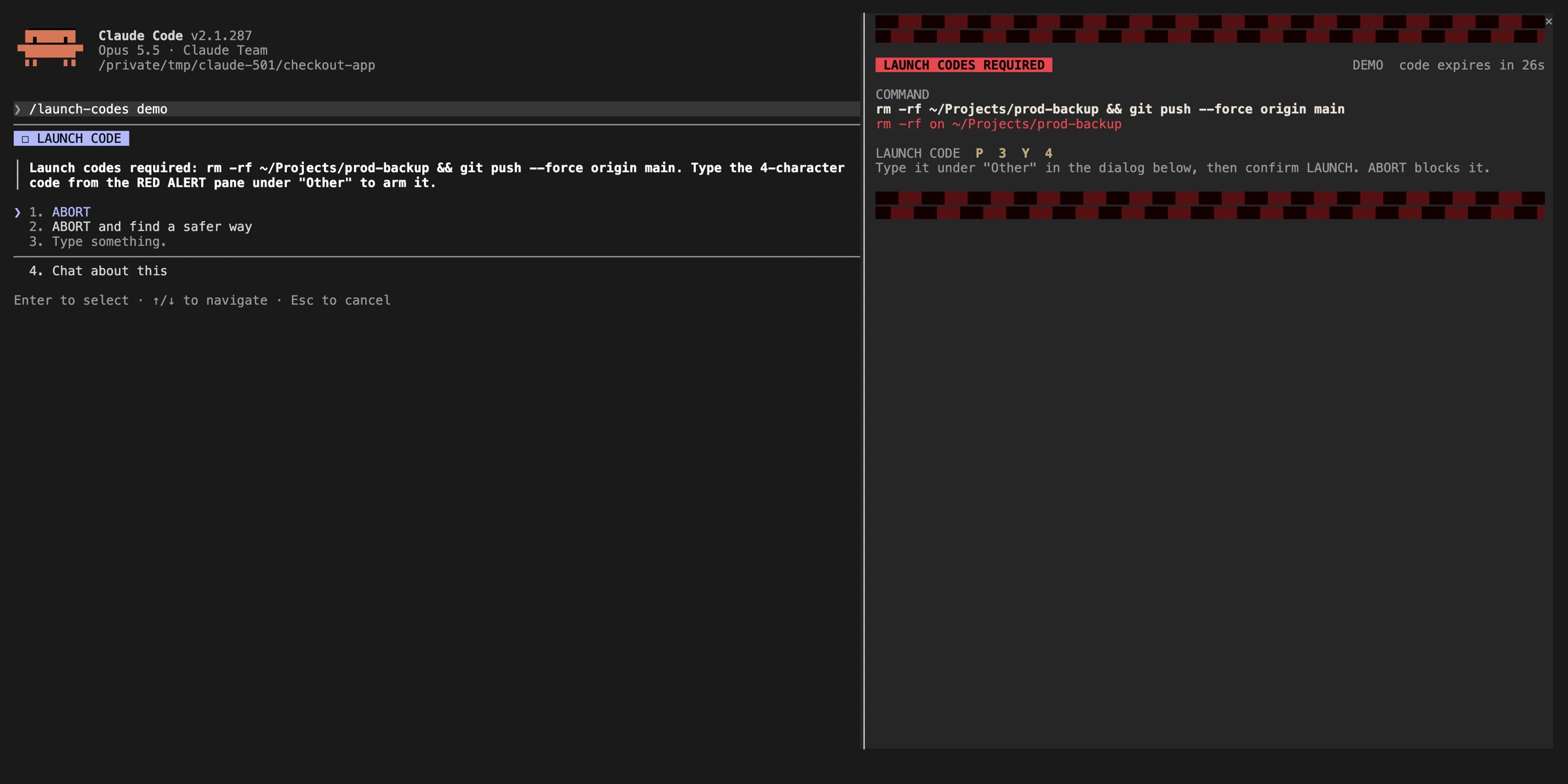
A sidebar beside the transcript in a wide terminal, or a framed region above the prompt in a narrow one. Your mod opens it with $.ui.open and fills it from a ui.render hook. It can hold tabs, buttons, text fields and selects.
on('ui.render', { component: 'Pane' }, async ($, e, next) => { if (e.requestId !== 'launch-codes') return next(e) const { Box, Text, Button } = $.ui.resolve(e) return Box({ flexDirection: 'column', children: [ Text({ bold: true, color: 'red', children: ['LAUNCH CODES REQUIRED'] }), Button({ key: 'run', label: 'Run it', onPress: approve }), ] })})A mod adds it
Band above the prompt
A strip directly above the prompt input that every mod shares. Return a tree to show something, or next(e) to show nothing. It is the best place for always-on status, like the last test run.
on('ui.render', { component: 'AbovePrompt' }, async ($, e, next) => { const { Text } = $.ui.resolve(e) return Text({ children: ['tests · last run failed · 3 runs'] })})A mod adds it
Toast
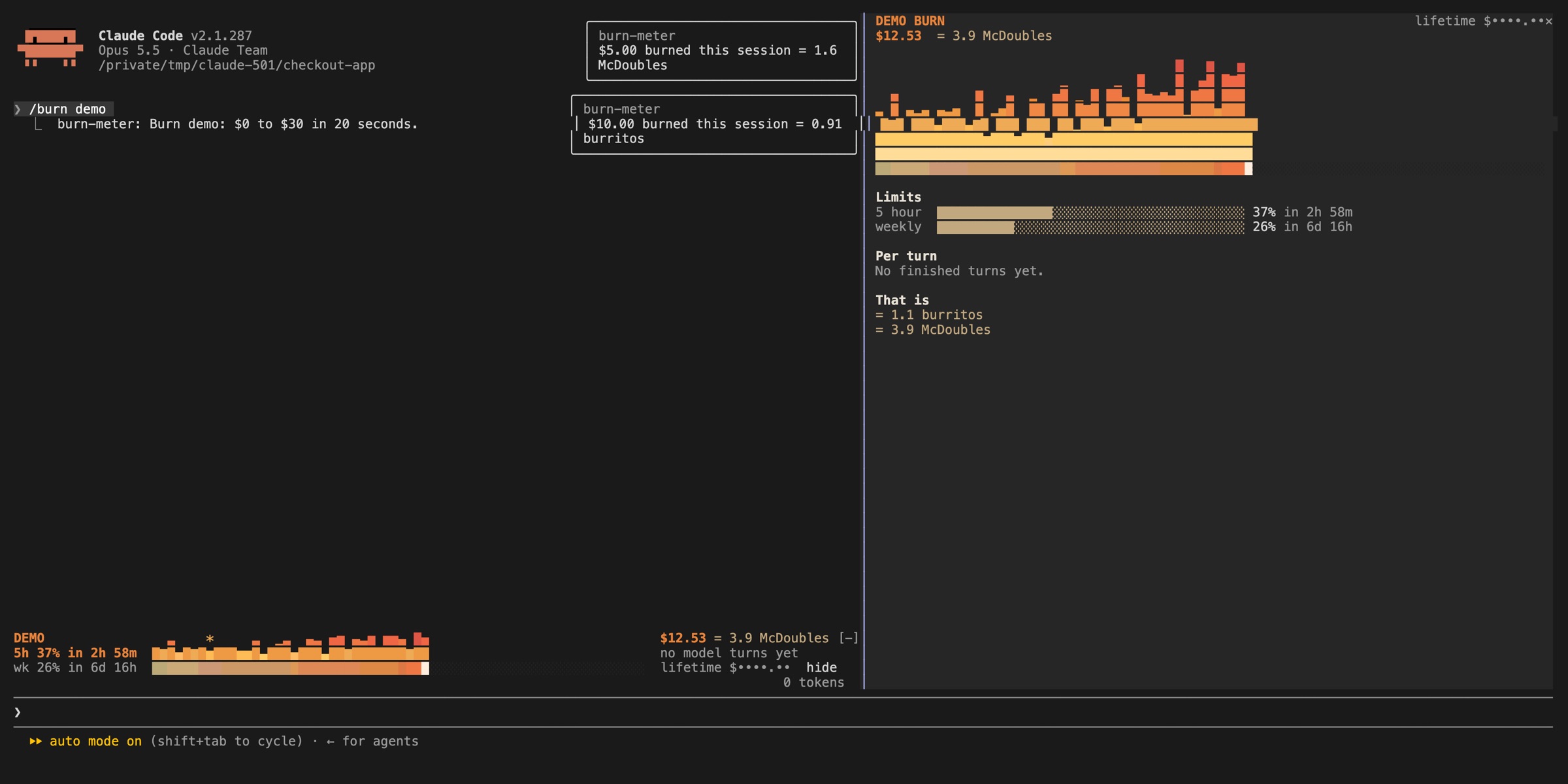
A small notice at the top right of the transcript, shown for 4 seconds by default. Use it to say something is available without opening a pane.
$.ui.toast('burn-meter: $5.00 burned this session')A mod adds it
Log line
A dim line in the transcript that you see and Claude doesn't read. Good for audit trails such as files changed or commands held.
$.ui.log('Claude changed ' + e.file_path)A mod adds it
Status line
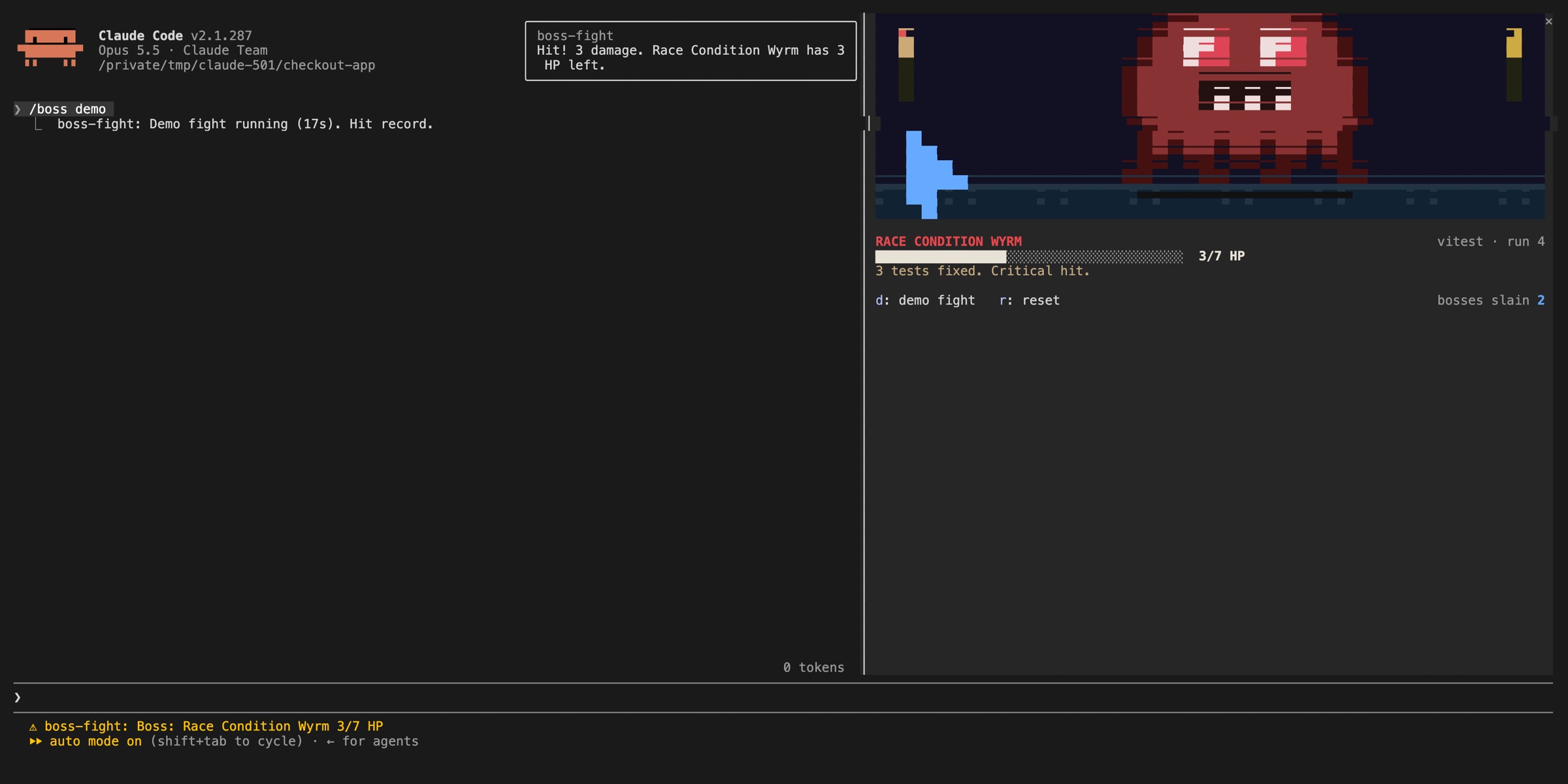
One line under the prompt that stays until you change it. It starts with ⚠ and your mod's name. Use it for a background check that should stay visible, such as CI status.
$.ui.status('checks: 3 passing')// shows as: ⚠ ci-watch: checks: 3 passingA mod redraws it
Spinner
The line that animates while Claude works. Pass next a copy of the event with new props to add a suffix, or return your own tree to replace it.
on('ui.render', { component: 'Spinner' }, async ($, e, next) => next({ ...e, props: { ...e.props, suffix: ' · tool calls: ' + calls + '…' } }))A mod redraws it
Tool rows
ToolUse, ToolResult and ToolGroup: a tool call's row, its result and a collapsed group. Restyle them, or replace them with something easier to scan.
on('ui.render', { component: 'ToolUse' }, async ($, e, next) => next(e))A mod redraws it
Messages
UserMessage and AssistantMessage in the transcript. Mods such as prismantis restyle replies with tables and diagrams.
on('ui.render', { component: 'AssistantMessage' }, async ($, e, next) => next(e))A mod redraws it
Hint & mode lines
PromptHint (the hint line under the prompt), SessionMode (the mode labels in the footer) and InfoNotice. Some of these are terminal-only.
on('ui.render', { component: 'PromptHint' }, async ($, e, next) => next(e))Claude Code only
Prompt & permission prompt
The prompt box is Claude Code's own, and the permission prompt is not a render site at all. A mod can't change what a permission prompt shows you. That is a deliberate safety line.
In a terminal narrower than the pane needs, the pane sits above the prompt instead of beside the transcript.
02 · Capabilities
What a mod can do that hooks, skills and MCP can't
Settings hooks, skills, status lines and MCP servers all work from outside Claude Code: they run a script, or give Claude text or tools. A mod runs inside, in Claude Code's own process.
Draw an interface you can use
Panes beside the transcript and a band above the prompt, with tabs, buttons, text fields and selects.
Redraw Claude Code itself
Restyle or replace the spinner, tool rows, messages and the question dialog.
Step into a tool call
Refuse it, rewrite its arguments, hold it while you ask the user, or answer it without running the tool.
Run code on a /command
Your function runs at once, with no Claude turn, even while Claude is working.
Share data between hooks
Hooks in one file share variables: one counts tokens, another charts them in a pane.
Some of Claude Code's own features are already mods: /diff, AGENTS.md loading, telemetry, and the plugin-authoring skill. Run /plugin → Installed and look under Built-in.
03 · The model
Every hook does one of three things
A hook is a function you pass to on(eventName, [matcher], hook). Claude Code calls it with three arguments: $, the mods API; e, the event as plain data; and next, which passes the event on to the other mods and then to Claude Code. What you do with next decides the outcome:
The event passes through your hook untouched and the tool runs as usual.
Note what happened and pass the event on unchanged. This hook counts tool calls and asks for a redraw so the spinner can show the count.
let calls = 0 export function register(on) { on('tool.call', async ($, e, next) => { calls += 1 $.ui.invalidate('ui.render') // redraw, so the new count shows return next(e) // let the tool run as usual })}Change the event before it continues. Here every prompt that mentions a PR gets the current branch name added as context only Claude reads.
on('prompt.submit', async ($, e, next) => { if (!/\bPR\b|pull request/i.test(e.text)) return next(e) const r = await $.process.run(['git', 'branch', '--show-current']) return next({ ...e, context: [...(e.context ?? []), 'Branch: ' + r.stdout.trim()] })})Handle the event yourself and never call next. A force push never reaches Bash, no permission prompt appears, and Claude reads your deny text as the tool's result.
on('tool.call', { tool: 'Bash' }, async ($, e, next) => { if (/git push .*--force/.test(e.command)) { return { deny: 'Force pushes are not allowed here. Push to a new branch instead.' } } return next(e)})Result
The observe hook, live
Claude lists a directory and reads two files. The spinner suffix counts each call: Thinking · tool calls: 1…, then 2, then 3. That is the whole Observe example above.
Recording: Anthropic, Claude Code docs


04 · No code
Make a mod with just a prompt
You don't need to know JavaScript. Describe the mod in an interactive Claude Code session and Claude writes it with the built-in plugin-authoring skill (or run /plugin-authoring yourself first). You approve the files, and the mod is live when the turn ends.
❯ make a mod that shows the current git branch above the prompt
● I'll build it with the plugin-authoring skill.
● Write(~/.claude/dev-mods/3f2a…/git-branch/hooks/register.js)
Enable hot reloading for this session?
❯ 1. Enable for this session
2. Not now
● Done. The mod loads when this turn ends.
⎇ feature/checkout-tests
❯
Describe it in plain words
Say where it draws (above the prompt, a pane, a status line), when it reacts (every tool call, a /command, the end of a turn) and what it shows or blocks.
Approve the files
Claude writes into
~/.claude/dev-mods/<session-id>/. That is a protected path, so in default and acceptEdits modes you approve each file.Enable hot reloading
On the first file Claude Code asks once per session. Enable for this session loads the mod when the turn ends and reloads it after every turn that changes it.
Try it, then ask for changes
Check
/plugin→ Installed. Not quite right? Say what to change. The next turn reloads it.Keep it
A session's mods folder is cleaned up eventually. Copy the mod out, e.g. to
~/mods/git-branch, and start withclaude --plugin-dir ~/mods/git-branch.
A mod Claude writes doesn't load in claude -p, in dontAsk mode, in an untrusted folder, or when mods are off (--safe-mode, --bare, disableAllHooks).
Six prompts to copy for QA work
Test status above the prompt
BandMake a mod that watches Bash commands that run tests (playwright test, vitest, jest, pytest, npm test) and shows the last result in the band above the prompt: passed or failed, plus how many runs failed this session. Show nothing until the first test run.
Ask before destructive commands
Question dialogMake a mod that holds any Bash command matching rm -rf, git reset --hard, git push --force or DROP TABLE and asks me "Run it" or "Refuse" before it runs. If I dismiss the question or nobody can answer, refuse.
Current git branch
BandMake a mod that shows the current git branch above the prompt.
Keep production safe
Tool checkMake a mod that refuses Bash commands that call our production host api.example.com unless the current git branch starts with release/. Tell Claude why in the refusal.
/bug: draft a bug report
CommandAdd a /bug command that takes my description and turns it into a bug report with title, steps to reproduce, expected and actual result, using a small model. Print it in the transcript without starting a Claude turn.
One-line turn summary
Under the answerMake a mod that, at the end of each turn, shows one line under the answer: files changed, test commands run, and whether they passed.
Tip: end any of these with "then run claude plugin validate and add a test". Claude checks its own work, and you get a list of every event the mod hooks and every API it calls.
05 · Hands-on
Write your first mod in five minutes
Path A · Ask Claude
Describe it in a session, for example make a mod that shows the current git branch above the prompt. Claude uses the built-in plugin-authoring skill, writes the mod into ~/.claude/dev-mods/<session-id>/, and asks whether to enable hot reloading. Approve, and the mod reloads at the end of every turn that changes it.
Path B · Write it yourself
Three files, no Node.js, no bundler. Claude Code loads .js and .ts directly.
first-mod/
├── .claude-plugin/
│   └── plugin.json   ← manifest
└── hooks/
    ├── hooks.json    ← "modules": ["./register.js"]
    └── register.js   ← your hooks
Point Claude Code at your code
The
moduleskey inhooks/hooks.jsonis what makes a plugin a mod.hooks/hooks.jsonjson{ "description": "The first-mod hooks module", "modules": ["./register.js"]}Write the hooks: a counter plus a /tally command
hooks/register.jsjslet calls = 0 export function register(on) { on('session.start', async ($, e, next) => { await $.command.register({ name: 'tally', description: 'Show how many tool calls Claude has made' }) return next(e) }) on('tool.call', async ($, e, next) => { calls += 1 $.ui.invalidate('ui.render') return next(e) }) on('command.run', { command: 'tally' }, async () => { return { text: 'Claude has made ' + calls + ' tool calls since this mod loaded' } }) on('ui.render', { component: 'Spinner' }, async ($, e, next) => { return next({ ...e, props: { ...e.props, suffix: ' · tool calls: ' + calls + '…' } }) })}Load it, then check what Claude Code sees
--plugin-dirloads the directory for one session and hot-reloads on save.claude plugin validatestatically lists every event you hook and every API you call.terminalbashclaude --plugin-dir ./first-mod claude plugin validate ./first-mod ❯ ./register.js hooks: session.start, tool.call, command.run{command=tally}, ui.render{component=Spinner} ❯ ./register.js calls: $.command.register, $.ui.invalidate✔ Validation passedTest it with no session, sign-in or network
tests/first-mod.test.tstsimport { expect, test } from 'claude-code/testing' test('/tally reports the tool calls the mod has seen', async ($, on) => { on('tool.call', () => ({ result: 'ok' })) // stub: no real tool runs await $.tool.call({ tool: 'Bash', command: 'ls' }) await $.tool.call({ tool: 'Read', file_path: 'README.md' }) const answer = await $.command.run({ command: 'tally', args: '' }) expect(answer.text).toBe('Claude has made 2 tool calls since this mod loaded')})terminalbashclaude plugin test(pass) /tally reports the tool calls the mod has seen [22.87ms] 1 pass 0 fail
Result
One step further: a pane with tabs
/hello-tabs opens a pane with two tabs. Press 2, then a to add one. The count survives a restart because it lives in $.store.
Recording: Anthropic, Claude Code docs


06 · Choosing
Mod, settings hook, skill or MCP server?
They overlap, and one plugin can ship all four. Reach for a mod only when the others can't do the job.
| Mod | Settings hook | Skill | MCP server | |
|---|---|---|---|---|
| What it is | Functions Claude Code calls in its own process | A shell command, HTTP request or prompt on a lifecycle event | A SKILL.md of instructions Claude reads | An external process that gives Claude tools |
| What it can change | Tool calls, prompts, commands, turns, the interface | Whether a call goes ahead; its args and result; added context | What Claude knows and does | Which tools Claude has |
| Draws in the UI | Yes | No | No | No |
| You write | JavaScript / TypeScript | A script + settings.json | Markdown | A server, any language |
| Pick it when | You want a pane, a band, a /command, or to rewrite an event | You want to block/allow/log with a script you have | You keep pasting the same instructions | Claude must reach an external system |
07 · In the wild
Which problems mods actually solve
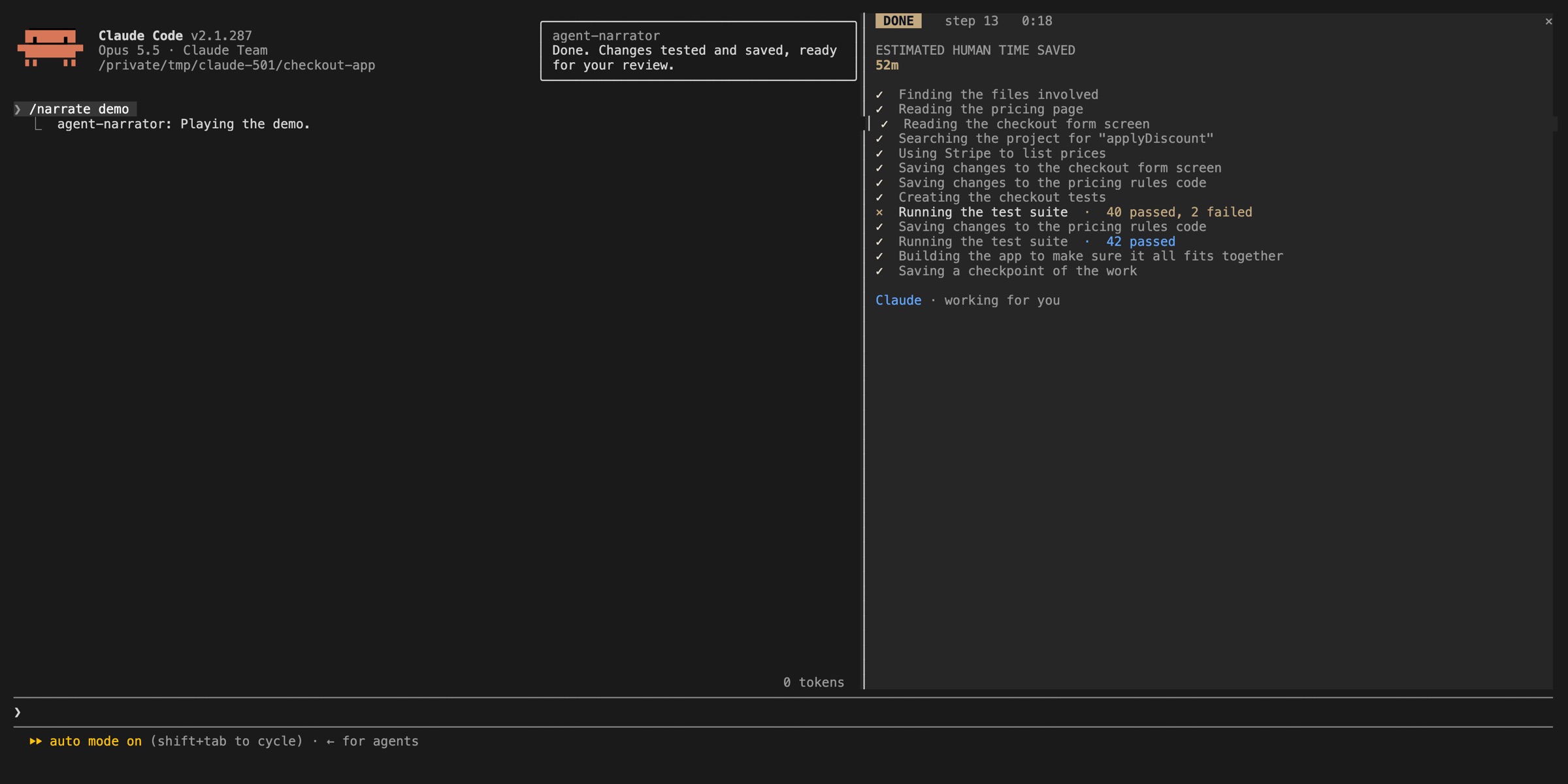
Within days of the launch, people were sharing mods on GitHub. The useful ones cluster around four pains: agents doing something irreversible, not seeing cost or context until too late, unreadable long runs, and leaking secrets on screen. These screenshots are from OneWave AI's open-source set (MIT):
Screenshots: OneWave-AI/claude-code-mods, MIT License.
12 mods worth installing first
Safety & privacy
blast-radiusAnthropic sampleHolds rm -rf or a force push, shows what it would change, asks to proceed.
launch-codesOneWave AIClassifies every Bash command; risky ones need a one-time code.
secret-redactorray-amjadMasks secrets before the model reads them.
Usage & visibility
token-weatherAnthropic sampleA forecast of your context window above the prompt.
burn-meterOneWave AISession spend and plan limits, live.
context-lensArunjay4213How full the context window is, and what fills it.
agent-flowCharlie0113-TLive tree of subagents and what each is doing.
Reading & review
replay-theaterAnthropic sample/replay steps through the file edits of the last turn.
claude-reviewr3al1tymThe latest reply in a side pane, rendered for reading as it streams.
review-paneRudra SecureFile diffs with line-by-line comments.
agent-narratorOneWave AIPlain-English narration of each step.
Fun (that still informs)
boss-fightOneWave AIFailing tests become a boss you beat by fixing them.
Anthropic's samples live in anthropics/claude-code-playground and are shared as-is, without support. Read any mod's source before installing it. The next section on security explains why.
08 · For testers
Mods for QA engineers: three recipes
For a QA team, a mod puts a test signal or a guard right where the agent works. That beats a dashboard in another tab or a rule in a README nobody reads.
1. Test-run status above the prompt
Watch Bash calls that look like a test run, wait for the result, and keep a one-line verdict in the band.await next(e) lets the command run first. isError is set when the tool reports an error, and the docs don't promise that for every non-zero exit, so the hook also reads result.text (the output as Claude reads it) for a "N failed" summary.
const TEST = /\b(playwright test|vitest|jest|pytest|npm (run )?test)\b/let runs = 0, failed = 0, last = '' export function register(on) { on('tool.call', { tool: 'Bash' }, async ($, e, next) => { if (!TEST.test(e.command)) return next(e) const result = await next(e) // run the tests first // isError = the tool reported an error; also read the output for "N failed" const red = result.isError || /[1-9]d* failed|FAIL/.test(result.text ?? '') runs += 1 if (red) failed += 1 last = red ? 'failed' : 'passed' $.ui.invalidate('ui.render') return result // Claude still reads the real output }) on('ui.render', { component: 'AbovePrompt' }, async ($, e, next) => { if (runs === 0) return next(e) // nothing to show yet const { Box, Text } = $.ui.resolve(e) return Box({ flexDirection: 'row', columnGap: 2, children: [ Text({ bold: true, children: ['tests'] }), Text({ color: last === 'failed' ? 'red' : 'green', children: ['last run ' + last] }), Text({ dimColor: true, children: [runs + ' runs · ' + failed + ' failed'] }), ] }) })}2. Hold destructive commands until a human decides
Agents in auto mode reset databases and force-push. This guard pauses the call and asks. $.ui.ask waits outside the 10-second hook limit, and a dismissed question or a claude -p run falls back to Refuse.
const RISKY = /\brm\s+-rf?\b|\bgit\s+reset\s+--hard\b|\bgit\s+push\b.*--force|\bDROP\s+TABLE\b/i export function register(on) { on('tool.call', { tool: 'Bash' }, async ($, e, next) => { if (!RISKY.test(e.command)) return next(e) let answer = 'Refuse' // safe default try { answer = await $.ui.ask('Run this command? ' + e.command, ['Run it', 'Refuse']) } catch {} // dismissed, or nobody to ask if (answer !== 'Run it') { return { deny: 'The user declined this command. Ask before trying a different approach.' } } return next(e) // permission check still runs })}The pattern matches text, so treat it as a seatbelt, not a lock. It misses git push -f. Real protection for main belongs on your Git host.
3. /triage: label a bug report without a Claude turn
$.model.complete sends one prompt to a small model with your credentials. It runs outside the conversation, so it costs a few tokens and doesn't touch the context.
on('command.run', { command: 'triage' }, async ($, e) => { const r = await $.model.complete({ model: 'haiku', system: 'Reply with one word: bug, feature, or question.', prompt: e.args, maxTokens: 20, timeoutMs: 15000, }) return { text: 'Label: ' + (r.isAnswered ? r.text.trim() : 'unknown') }})More QA ideas worth a mod
- Flaky-test radar. Count tests that pass on retry and chart them in a pane with a
Rasterheat map. - Env guard. Use
tool.checkto deny requests to production hosts while the branch isn't a release branch. - Recording mode. Redact tokens and customer data before they reach the screen when you demo or record a bug.
- Turn summary. In
turn.complete, return a line under the answer: files touched, tests run, pass/fail.
09 · Trust
Security: a mod is code with your permissions
Mods are not sandboxed. Even with sandboxing on, a process a mod starts runs outside the sandbox. Once loaded, a mod can:
- Act on your machine as you. Read and write any file, start programs, make network requests.
- Read your secrets. Environment variables and settings files, including API keys.
- See your session. Every prompt and every tool call.
- Act without asking. Approve a tool call before you're asked, rewrite prompts, submit one as if you typed it.
- Spend your usage. Call a model on your plan or API key.
The one line it can't cross: the permission prompt is not a render site, so a mod can't change what it shows you. Before installing, list exactly what a mod does without running it:
git clone https://github.com/someone/some-mod && claude plugin validate ./some-mod# read the hooks: and calls: lines. $.process.run or $.fs.write deserve a look at the sourceTurning mods off
- One mod.
/plugin→ Installed → disable or uninstall. - All installed mods, one session.
claude --safe-mode - All installed mods, everywhere.
"disableAllHooks": truein~/.claude/settings.json. This also stops settings hooks and your custom status line. - Organisations. Managed settings can limit mods to managed ones (
allowManagedModsOnly).
Where mods run
| Where you run Claude Code | Hooks run | Drawings appear |
|---|---|---|
| claude in a terminal (incl. editor terminals, JetBrains) | Yes | Yes |
| Desktop app, Code tab | Yes | Yes, except terminal-only elements |
| VS Code extension chat panel | Yes | No |
| claude -p and the Agent SDK | Yes | No |
| Remote Control (claude.ai / mobile) | Yes, on your machine | In your local terminal |
| Cloud session | If the plugin reaches it | No |
| WSL session in the Desktop app | No | No |
10 · Watch
Four videos worth your time
Picked for different angles: setup, a fast overview, community ideas, and what can go wrong. Videos load only when you press play.
Five practical mods: context and usage tracking, hiding sensitive details while recording, following long-running goals.
The fastest overview: what a mod can do and how to get one by asking Claude.
A tour of community mods with ideas to copy.
Hooks vs skills vs mods, and a secret-hiding guard. Watch it for the failure modes.
11 · Cheat sheet
Quick reference
| Event | Fires when | A hook can return |
|---|---|---|
tool.call | A tool is about to run | next(e) · { deny } · { result } |
tool.check | The allow / ask / deny decision | { decision, reason } |
prompt.submit | You submit a prompt | next({ ...e, text | context }) · { drop } |
command.run | A /command runs | { text } · {} · next(e) |
ui.render | A render site is about to draw | a tree · next(e) with new props |
session.start | Before the first prompt, and after a reload | next(e) |
turn.complete | A turn ended | { text } under the answer |
agent.spawn | A subagent is about to start | next({ ...e, model }) · { deny } |
| Hook execution time | 10 s (50 ms for prompt.edit) |
|---|---|
| $.store | 4 MiB of JSON in total |
| $.process.run timeout | 30 s default, 10 min max |
| Redraws | Throttled to 10/s (30/s for the visible pane in the terminal) |
| Pane opened without the user asking | Placed from 144 columns |
Events and methods change between releases. Claude Code writes exact .d.ts types for your version into .claude-plugin/types/ of every mod it loads with --plugin-dir. When the types and a web page disagree, trust the types.
Key takeaways
- A mod is a plugin with a hooks module: three files, no build step, loaded with --plugin-dir or installed from a marketplace.
- Every hook gets ($, e, next) and does one of three things: observe (return next(e)), rewrite (next with a changed event) or answer (return without calling next).
- Mods can draw in a pane, the band above the prompt, toasts and log lines, and restyle the spinner, tool rows and messages. They cannot change the permission prompt.
- Mods are not sandboxed: they run with your permissions. Run claude plugin validate to list a mod's hooks and calls before you install it.
- For QA the strongest uses are guards on destructive commands, live test-run status above the prompt, and secret redaction while recording.
FAQ
Frequently asked questions
What is a Claude Code mod?
A plugin made of JavaScript or TypeScript event handlers that Claude Code calls in its own process. When an event happens, such as a tool call, a submitted prompt or a part of the interface being drawn, the handler can watch it, change it or take it over.
Which Claude Code version do mods need?
Claude Code v2.1.287 or later in the terminal, and v2.1.286 or later in the Code tab of the Claude Desktop app. Mods are on by default; check your version with claude --version, or /status in the Desktop app.
How is a mod different from a settings hook?
A settings hook is a shell command, HTTP request or prompt configured in settings.json that runs on a lifecycle event. A mod is a function that runs inside Claude Code, so besides allowing or blocking an event it can rewrite prompts, answer tool calls itself, add instant /commands and draw in the interface.
Do I need to know TypeScript to make a mod?
No. Describe the mod in a Claude Code session and Claude writes it using the built-in plugin-authoring skill, then hot-reloads it after you approve. You can also write one by hand: Claude Code loads .js and .ts files directly, with no bundler or build step.
Are Claude Code mods safe?
Mods are not sandboxed. A mod can read and write your files, read environment variables and API keys, see every prompt and tool call, approve tool calls for you and spend your usage. Install mods only from authors you trust and run claude plugin validate on the directory first to list the events it hooks and the API calls it makes.
How do I turn mods off?
Disable one mod in /plugin → Installed. Start a session with --safe-mode to skip every installed mod for that session, or set "disableAllHooks": true in ~/.claude/settings.json to stop them everywhere. That setting also stops your settings hooks and custom status line. Built-in mods keep running.
Do mods work in the VS Code extension and claude -p?
The hooks run there, but nothing a mod draws appears. Panes, bands and replaced rows show only in the terminal and in the Desktop app's Code tab. A mod can check e.surface and fall back to a transcript line or a command reply.
Can I test a mod automatically?
Yes. claude plugin test runs tests from the mod's tests folder with no session, sign-in or network. A test fires events such as tool calls and commands and checks what the hooks returned, using expect and test from claude-code/testing.