HTTP status codes for testers
Every response starts with three digits. The first one tells you who’s at fault, the rest tell you what to check. 32 codes, the pairs people confuse, test snippets and a cheat sheet to download.
- GET/api/orders/42200
- POST/api/orders201
- GET/shop301
- DELETE/api/orders/43401
- GET/api/orders/999404
- POST/api/login429
- GET/api/reports504
504 Gateway TimeoutThe app behind the gateway never answered.
Read the first digit
4xx → fix the request.5xx → file a bug.A 2xx with the wrong data is still a failed test.
32 codes, explained for testers
Open a code to see where you meet it and what to check. Type a number, a name or a word like “token”.
32 codes shown
100ContinueHeaders look fine, send the body.
Where you meet it
Large uploads with Expect: 100-continue. curl does it for you.
What to check
Nothing, unless you test an upload proxy.
101Switching ProtocolsUpgrading the connection, usually to WebSocket.
Where you meet it
The handshake of every WebSocket connection.
What to check
A WebSocket test that never sees 101 never connected.
103Early HintsStart preloading these files while I build the page.
Where you meet it
CDNs send it before the real response to speed up page loads.
What to check
Browsers handle it; your final assertion is still on the real status.
200OKRequest succeeded, here is the result.
Where you meet it
Successful GET, and PUT/PATCH/POST that return data.
What to check
200 is not enough: assert the body, the schema and the data.
201CreatedA new resource was created.
Where you meet it
POST that creates a user, order, ticket.
What to check
Expect a Location header with the new URL, then GET it.
Getting 200 after a create is a common, minor bug.
link202AcceptedGot it, will process later.
Where you meet it
Async jobs: reports, exports, bulk imports.
What to check
Poll the status endpoint until the job finishes; don't assert the result right away.
204No ContentDone, nothing to send back.
Where you meet it
DELETE, or PUT that returns no data.
What to check
The body must be empty. A JSON body with 204 is a bug.
206Partial ContentHere is the part you asked for.
Where you meet it
Video streaming, resumable downloads (Range header).
What to check
Check Content-Range matches the requested range.
301Moved PermanentlyThis URL moved for good.
Where you meet it
Domain migration, old links, http → https.
What to check
Browsers cache it hard: test in a fresh context. Clients may turn POST into GET.
Use 308 if the method must stay POST.
link302FoundTemporarily elsewhere.
Where you meet it
Redirect after login, maintenance pages.
What to check
Follow Location; don't let the test client silently follow if you assert the redirect itself.
Use 307 if the method must stay POST.
link303See OtherDone, now GET the result over there.
Where you meet it
After a form POST, to stop double submits on refresh.
What to check
The follow-up request must be a GET.
304Not ModifiedYour cached copy is still good.
Where you meet it
Repeat request with If-None-Match (ETag) or If-Modified-Since.
What to check
No body. Assert it with an API client that sends If-None-Match: a page fetch() only ever sees the cached 200.
307Temporary RedirectTemporarily elsewhere, keep the same method.
Where you meet it
Temporary moves of APIs that take POST/PUT.
What to check
The repeated request must keep its method and body.
308Permanent RedirectMoved for good, keep the same method.
Where you meet it
Permanent moves of APIs that take POST/PUT.
What to check
Like 301, but POST stays POST.
400Bad RequestThe server can't read your request.
Where you meet it
Broken JSON, wrong type, missing required field.
What to check
The error body should name the field. A bare 400 with no message is a usability bug.
Valid JSON that breaks a business rule is often 422.
link401UnauthorizedWho are you? Log in first.
Where you meet it
No token, expired token, wrong signature.
What to check
Every protected endpoint without a token → 401. Look for a WWW-Authenticate header.
Logged in but not allowed → 403.
link403ForbiddenI know who you are. Still no.
Where you meet it
Valid user, wrong role or someone else's resource.
What to check
Log in as user A, request user B's data → 403 or 404, never 200.
Not logged in at all → 401.
link404Not FoundNothing here.
Where you meet it
Wrong URL, deleted record, typo in the ID.
What to check
Also used on purpose to hide resources you may not see. Check the error body is JSON, not an HTML page.
Gone for good and the API says so → 410.
link405Method Not AllowedThis URL exists, but not for this method.
Where you meet it
DELETE on a read-only endpoint, POST to a GET route.
What to check
The response must include an Allow header listing valid methods.
408Request TimeoutYou took too long to send the request.
Where you meet it
Slow client or flaky network, idle connections.
What to check
Safe to retry. Not the same as your test tool's own timeout.
409ConflictClashes with the current state.
Where you meet it
Duplicate email, editing a stale version, double booking.
What to check
Create the same thing twice → second call 409, and only one record in the DB.
410GoneIt was here, it's deleted for good.
Where you meet it
Retired API versions, expired links.
What to check
Unlike 404, a 410 tells clients and crawlers to stop asking.
412Precondition FailedSomeone changed it since you last looked.
Where you meet it
PUT/PATCH with If-Match: <etag> after another user edited the record.
What to check
Two clients edit the same record: the second save → 412, not a silent overwrite.
413Content Too LargeThe body is too big.
Where you meet it
File uploads over the limit.
What to check
Upload limit + 1 byte → 413 with a readable message. (Old name: Payload Too Large.)
415Unsupported Media TypeI don't accept that format.
Where you meet it
Wrong or missing Content-Type, XML to a JSON API.
What to check
Send text/plain to a JSON endpoint → 415, not 500.
422Unprocessable ContentReadable, but the data makes no sense.
Where you meet it
Valid JSON with an end date before the start date, negative quantity.
What to check
Expect field-level errors. (Old name: Unprocessable Entity.)
Can't parse it at all → 400.
link429Too Many RequestsSlow down.
Where you meet it
Rate limits, login brute-force protection, load tests.
What to check
Look for Retry-After. Your test suite hitting 429 is a suite problem, not an app bug.
500Internal Server ErrorSomething crashed on the server.
Where you meet it
Unhandled exception, null pointer, bad SQL.
What to check
Always a bug, even for bad input (that should be 4xx). Attach the request and timestamp; check logs.
501Not ImplementedThe server doesn't support this at all.
Where you meet it
Unknown HTTP method, unfinished feature.
What to check
Rare. On a documented endpoint it means the docs are ahead of the code.
502Bad GatewayThe proxy got garbage from the app behind it.
Where you meet it
App crashed or restarted behind nginx, a load balancer or an API gateway.
What to check
The gateway is fine, the service behind it is not. Check that service's logs.
Upstream is slow, not broken → 504.
link503Service UnavailableDown or overloaded, try later.
Where you meet it
Deploys, maintenance, autoscaling not caught up.
What to check
May carry Retry-After. Check the page your users see is friendly.
504Gateway TimeoutThe proxy waited, the app never answered.
Where you meet it
Slow query, heavy report, a hung upstream.
What to check
Measure how long the backend takes; compare with the gateway timeout (often 30–60 s).
Upstream answered with garbage → 502.
linkThe pairs everyone mixes up
Same family, different fix. Pick a pair.
401 Unauthorized
“Who are you?”
DELETE /api/orders/43
(no Authorization header)
401 Unauthorized
WWW-Authenticate: Bearer
Fix: log in, refresh the token, check the header name.
403 Forbidden
“I know you. Still no.”
DELETE /api/orders/43
Authorization: Bearer <viewer token>
403 Forbidden
{ "error": "role 'viewer' can't delete" }
Fix: a different role or permission. Logging in again won’t help.
Test it: call every protected endpoint with no token (expect 401), then as a user without the role (expect 403). User A asking for user B’s data must never get 200.
400 Bad Request
“I can’t read this.”
POST /api/orders
{ "qty": 2,
400 Bad Request
{ "error": "Unexpected end of JSON" }Cause: broken JSON, wrong type, missing required field.
422 Unprocessable Content
“I read it. It makes no sense.”
POST /api/orders
{ "qty": -2 }
422 Unprocessable Content
{ "field": "qty", "error": "must be > 0" }Cause: valid JSON that breaks a business rule.
Test it: many APIs answer 400 to both, and that’s fine. What isn’t fine: a 500, or an error that doesn’t say which field is wrong.
Test it: for a redirected POST, check the method of the second request. Turn off auto-follow (maxRedirects: 0 in Playwright, no -L in curl) to assert the redirect itself. 303 is the “done, now GET the result” redirect after a form submit.
Test it: a 5xx from the gateway means the gateway works. Look at the service behind it. Note the time and the request ID for the bug report.
Which code should the API return?
Answer a few questions about the request. Handy when a bug report says “wrong status” and you need to say which one is right.
Can the server parse the request?
No → 400 Bad RequestIs the caller logged in (valid token)?
No → 401 UnauthorizedIs the caller allowed to do this?
No → 403 ForbiddenDoes the resource exist?
No → 404 Not FoundDoes this URL accept this method?
No → 405 Method Not AllowedIs the data valid for the business rules?
No → 422 Unprocessable ContentDoes it fit the current state (no duplicate, not stale)?
No → 409 ConflictIs the caller under the rate limit?
No → 429 Too Many RequestsAll checks pass. What did the request do?
Assert it in your tests
Check the status first, then what must come with it: a header, an empty body, a field in the error.
import { test, expect } from '@playwright/test'; test('create order returns 201 + Location', async ({ request }) => { const res = await request.post('/api/orders', { data: { sku: 'A-1', qty: 2 } }); expect(res.status()).toBe(201); expect(res.headers()['location']).toMatch(/\/api\/orders\/\d+$/);}); test('no token returns 401', async ({ request }) => { const res = await request.delete('/api/orders/43', { headers: { Authorization: '' } }); expect(res.status()).toBe(401);}); test('old URL redirects permanently', async ({ request }) => { const res = await request.get('/shop', { maxRedirects: 0 }); expect(res.status()).toBe(301); expect(res.headers()['location']).toBe('/store');});# status code onlycurl -s -o /dev/null -w "%{http_code}\n" https://api.shop.test/api/orders/42 # status + headers (-i), no auto-follow of redirectscurl -i https://api.shop.test/shop # follow redirects and print the final statuscurl -sL -o /dev/null -w "%{http_code} %{url_effective}\n" https://api.shop.test/shoppm.test('201 Created', () => { pm.response.to.have.status(201); pm.response.to.have.header('Location');}); pm.test('rate limit tells me when to retry', () => { if (pm.response.code === 429) { pm.expect(pm.response.headers.has('Retry-After')).to.be.true; }});import requests BASE = "https://api.shop.test" def test_delete_without_token_is_401(): r = requests.delete(f"{BASE}/api/orders/43") assert r.status_code == 401 def test_empty_body_on_204(): r = requests.delete(f"{BASE}/api/orders/43", headers={"Authorization": "Bearer t"}) assert r.status_code == 204 assert r.content == b""Negative tests every endpoint needs
- No token, or an expired one401
- Valid token, wrong role403
- Someone else’s resource ID404
- Broken JSON, wrong types400
- Valid JSON, invalid values422
- Create the same thing twice409
- Wrong HTTP method405
- Burst of requests429
Any of these returning 500 is a bug: bad input must never crash the server.
Retry or not?
Retry only 408, 429 and 502/503/504, only for idempotent requests (GET, PUT, DELETE), with backoff and Retry-After. Never auto-retry a POST, and never retry the other 4xx: the same request fails the same way.
Not in the spec, still in your logs
Proxies, CDNs and browsers add their own numbers. You’ll see these in bug reports.
499
nginx
The client closed the connection before the server answered. Often your own test timeout.
520–527
Cloudflare
Cloudflare couldn't get a proper answer from the origin: 521 = origin down, 522 = connection timed out, 524 = origin too slow.
0
Browsers, Playwright
Not an HTTP code: the request never got an answer: CORS block, DNS or network failure, or an aborted request.
418
RFC 2324 (a joke)
“I'm a teapot.” Reserved, never meant for real APIs. Some use it as an easter egg.
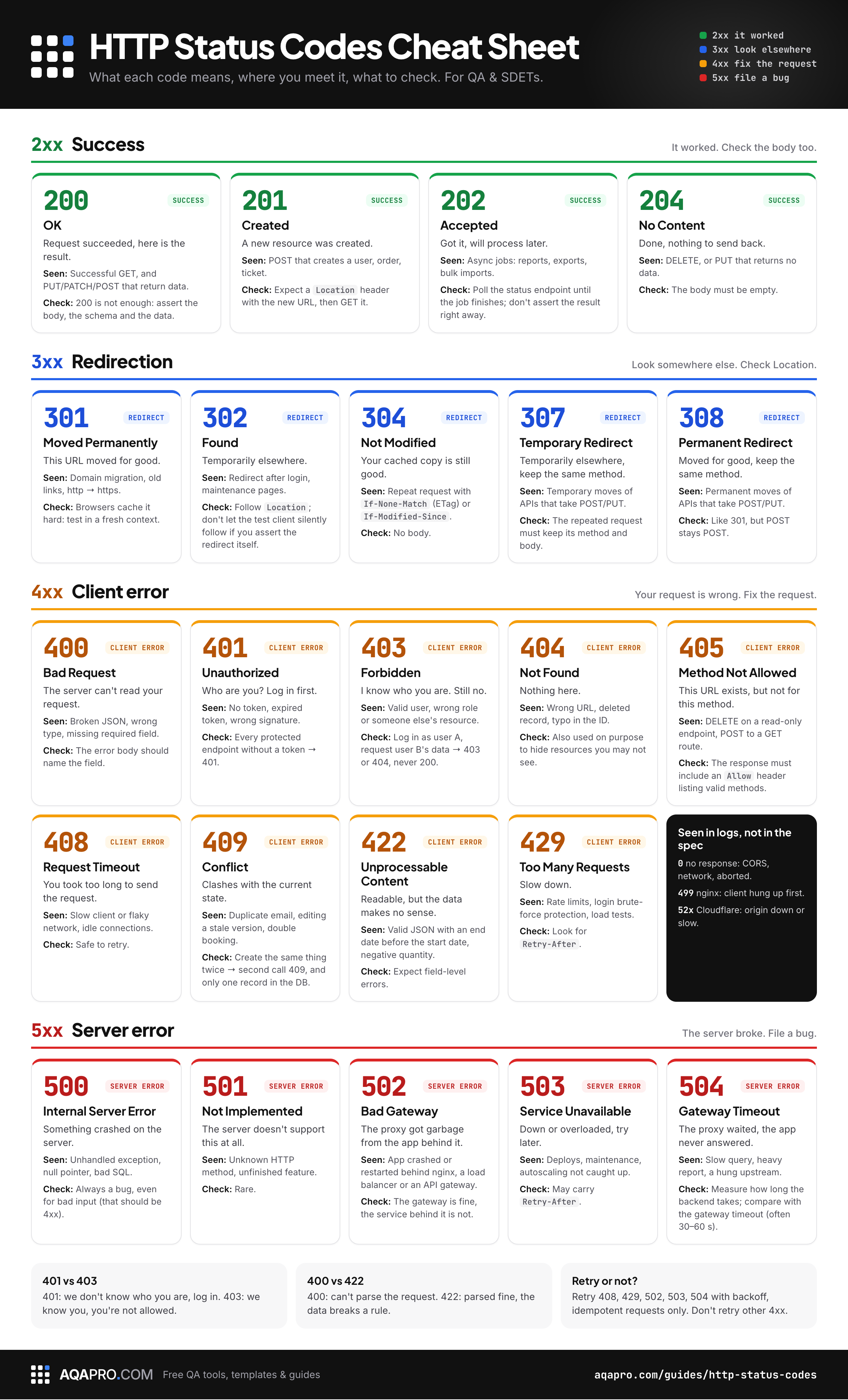
Download the cheat sheet
23 codes testers hit most, with what each one means and what to check. One PNG, free, print it or pin it in your team chat.
FAQ
What is the difference between 401 and 403?
401 Unauthorized means the server doesn't know who you are: no token, an expired one, or a bad signature. Log in and try again. 403 Forbidden means the server knows exactly who you are and still says no, because your role doesn't allow it. Logging in again won't help.
When should an API return 400 and when 422?
400 Bad Request when the server can't parse the request: broken JSON, a string where a number belongs, a missing required field. 422 Unprocessable Content when the request is well-formed but breaks a business rule, like an end date before the start date. Many APIs use 400 for both; what matters is that the error body names the field.
What status code should a successful POST, PUT or DELETE return?
POST that creates something: 201 Created with a Location header. Work queued for later: 202 Accepted. PUT or PATCH that returns the updated object: 200 OK. DELETE or PUT with nothing to return: 204 No Content, with an empty body.
What does 429 Too Many Requests mean and how long should I wait?
You hit a rate limit. Read the Retry-After header: it holds either a number of seconds or an HTTP date, and it is the minimum wait. Without it, back off exponentially (1 s, 2 s, 4 s…). If your own test suite keeps hitting 429, slow the suite down or ask for a test-environment limit.
What is the difference between 301, 302, 307 and 308?
301 and 308 are permanent, 302 and 307 are temporary. 301 and 302 let clients change a POST into a GET when they follow the redirect; 307 and 308 must repeat the same method and body. For an API that takes POST, use 307 or 308.
Which HTTP errors should a test client retry?
Only 408, 429 and the transient 502, 503 and 504, and only for idempotent requests such as GET, PUT and DELETE. Don't auto-retry a POST, it can create duplicates. Never retry 400, 401, 403, 404, 409 or 422: the same request will fail the same way.
What is HTTP 499?
A non-standard nginx code: the client closed the connection before the server answered. In testing it usually means your client timeout is shorter than the server's processing time, so the server logged 499 while your test reported a timeout.
Why does Playwright or the browser show status 0?
Status 0 is not an HTTP code. The request never received a response: a CORS block, a DNS or network failure, or the request was aborted. Look at the console and the network tab, not at the server logs.