Boundary Value Analysis & Equivalence Partitioning: Generator + Examples
Bugs live at the edges. For an age field that accepts 18–65, 2-value BVA tests 17 18 65 66. 3-value BVA tests both neighbours of each of those: 16–19 and 64–67, eight values, not the common six. Type your own range below and copy the tests.
Each boundary value and both of its neighbours, invalid side included. ISTQB CTFL 4.0
64277| Value | Case | Expected |
|---|---|---|
16 | min − 2 | reject |
17 | min − 1 | reject |
18 | min | accept |
19 | min + 1 | accept |
64 | max − 1 | accept |
65 | max | accept |
66 | max + 1 | reject |
67 | max + 2 | reject |
import { test, expect } from "@playwright/test"; const cases = [ { age: 16, ok: false }, // min − 2 { age: 17, ok: false }, // min − 1 { age: 18, ok: true }, // min { age: 19, ok: true }, // min + 1 { age: 64, ok: true }, // max − 1 { age: 65, ok: true }, // max { age: 66, ok: false }, // max + 1 { age: 67, ok: false }, // max + 2]; for (const { age, ok } of cases) { test(`age = ${age} is ${ok ? "accepted" : "rejected"}`, async ({ page }) => { await page.goto("/form"); // your page await page.getByLabel("Age").fill(String(age)); await page.getByRole("button", { name: "Submit" }).click(); const error = page.getByRole("alert"); // your validation message if (ok) await expect(error).toBeHidden(); else await expect(error).toBeVisible(); });}import pytest @pytest.mark.parametrize("age, ok", [ (16, False), # min − 2 (17, False), # min − 1 (18, True), # min (19, True), # min + 1 (64, True), # max − 1 (65, True), # max (66, False), # max + 1 (67, False), # max + 2])def test_age_boundaries(age, ok): assert is_valid_age(age) is ok # your validator or an API callfield,value,case,expectedAge,16,min − 2,rejectAge,17,min − 1,rejectAge,18,min,acceptAge,19,min + 1,acceptAge,64,max − 1,acceptAge,65,max,acceptAge,66,max + 1,rejectAge,67,max + 2,reject| Field | Value | Case | Expected ||---|---|---|---|| Age | 16 | min − 2 | reject || Age | 17 | min − 1 | reject || Age | 18 | min | accept || Age | 19 | min + 1 | accept || Age | 64 | max − 1 | accept || Age | 65 | max | accept || Age | 66 | max + 1 | reject || Age | 67 | max + 2 | reject |Several fields at once, saved presets or one CSV for the whole form? The Boundary Value tool has the same variants, field by field.
- 2-value BVA4values for one range: 17 · 18 · 65 · 66
- 3-value BVA8ISTQB counts 17 and 66 as boundaries too
- Robust BVA7Jorgensen: ±1 around each edge + a nominal
- Per test1invalid value at a time, or errors hide each other
Equivalence partitioning and BVA in one minute
Two techniques that work as a pair. EP decides which groups of inputs exist; BVA tests where those groups meet.
Equivalence partitioning (EP) splits an input into partitions the system should treat the same way. If 30 is accepted, 40 should be too, so one value per partition is enough. You need both kinds: valid partitions, where input is accepted, and invalid ones, where it must be rejected.
Boundary value analysis (BVA) builds on EP. It tests the minimum and maximum of each ordered partition, because that is where developers write < instead of <=. Those slips stay invisible in the middle of a range.
For age 18–65, EP gives five tests, one per row of the table. BVA then pins down the two borders: 17|18 and 65|66.
| Partition | Values | EP pick |
|---|---|---|
| Too young (invalid) | ≤ 17 | 6 |
| Allowed (valid) | 18 – 65 | 42 |
| Too old (invalid) | ≥ 66 | 77 |
| Not a whole number (invalid) | 17.5, 18.5 … | 17.5 |
| Not a number / empty (invalid) | "abc", "" | "abc" |
2-value vs 3-value BVA: why it's 8 values, not 6
The ISTQB Foundation syllabus defines both. The common six-value set comes from counting only the edges of the valid range; ISTQB counts the edges of every partition.
Boundary values are the minimum and maximum of every ordered partition, the invalid ones too. For 18–65 that is 17 (max of “too young”), 18, 65 and 66 (min of “too old”).
2-value BVA: each boundary value and its closest neighbour in the adjacent partition. The neighbours are boundary values themselves, so the set is just 17 18 65 66.
3-value BVA: each boundary value and both its neighbours, whichever partition they belong to. 17’s neighbours are 16 and 18; 66’s are 65 and 67. That gives 16 17 18 19 64 65 66 67.
“It is a common misconception that 2-value BVA requires twice as many coverage items as borders, and 3-value BVA requires three times as many. Both are wrong.”ISTQB white paper, Hamburg and Roman
Does the extra pair matter? Run the bug hunt. A validator written as age != 17 rejects 17 and lets every younger age through. Only 16 catches it.
Spec: age >= 18. Pick a test set:
| Implemented as | 16 | 17 | 18 | 19 | Verdict |
|---|---|---|---|---|---|
age > 18Classic off-by-one: 18 itself is rejected.Caught | reject | reject | reject | accept | Caught |
age >= 17The edge moved one step down: 17 gets in.Caught | reject | accept | accept | accept | Caught |
age == 18Only exactly 18 passes. 17 and 18 still look right.Caught | reject | reject | accept | reject | Caught |
age != 17Rejects only 17. Every under-17 slips through.Caught | accept | reject | accept | accept | Caught |
age > 17Same as the spec for whole numbers. Not a bug, but try 17.5.Not a bug | reject | reject | accept | accept | Not a bug |
4 of 4 bugs caught. Red cells are the values where the wrong code answers differently from the spec.
Use 2-value BVA for low-risk fields and UI suites; use 3-value where a wrong edge costs money or access: prices, eligibility, permissions, limits.
Robust and worst-case boundary testing
These terms come from Paul Jorgensen’s Software Testing: A Craftsman’s Approach, not from ISTQB. They matter once a form has more than one field.
Normal BVA varies one field at a time through min, min + 1, max − 1 and max, with the other fields at a nominal middle value. Robust BVA adds the invalid min − 1 and max + 1. Worst-case drops the one-field-at-a-time rule and combines every value of every field. Move the slider to see what that costs.
- Normal BVA13
4n + 1min, min + 1, max − 1, max per field, the rest at nominal
- Robust BVA19
6n + 1adds min − 1 and max + 1 per field
- Worst-case125
5ⁿevery combination of the 5 normal values
- Robust worst-case343
7ⁿevery combination of all 7 values
- Pairwise over the 7 robust values49
every pair once
Find every partition first
BVA is only as good as the partitions you found. For every input, write these six down before you pick a single value.
- Valid range or rangesSeveral ranges when the rules split them, like discount bands.
- Below min and above maxEach is its own invalid partition with its own boundary values.
- Wrong typeText in a number field, a decimal in a whole-number field.
- Empty, null, missing keyAnd whitespace only. APIs treat these three differently.
- Format variants
007,1e3,+18,18,5with a comma, full-width digits. - Implicit limitsDatabase column length, int32 (2,147,483,647), proxy upload limits.
Test each invalid partition on its own. A request with a bad age and a bad email stops at the first error, and the second one is never checked. Let an AI draft partitions from a requirement
Beyond numbers: strings, dates, files
BVA works on anything with an order. Find the step: the smallest change the system can tell apart. Get the step wrong and your “neighbour” isn’t one.
| Input | Ordered by | Step | 2-value example |
|---|---|---|---|
| String length 3–20 | length | 1 character | 2, 3, 20, 21 characters |
| Money 50.00 and up | amount | 0.01 | 49.99, 50.00 |
| Date from today | day | 1 day | yesterday, today |
| Time window | instant | 1 s (or 1 ms) | 23:59:59, 00:00:00 |
| File size ≤ 10 MiB | bytes | 1 byte | 10,485,760 and 10,485,761 B |
| Enum: card, paypal, bank | none (no order) | — | EP only: each value + one unknown |
| Boolean | none | — | EP only: true, false, missing |
Five worked examples
Each one runs through the generator above. Load it, switch between 2-value and 3-value, and copy the tests.
Age: whole number, 18 to 65
RuleSign-up accepts ages 18 to 65 inclusive.
3-value BVA · 8 values
16min − 217min − 118min19min + 164max − 165max66max + 167max + 2
- Ask whether 65 is included before you write a test. “Between 18 and 65” is read both ways.
- EP adds the non-boundary invalid classes:
17.5,"abc"and an empty field. One per test.
Password: 8 to 64 characters
RuleA password has at least 8 and at most 64 characters. Length can't go below 0, so 0 (empty) is the smallest boundary value.
3-value BVA · 10 values
0lowest1lowest + 16min − 27min − 18min9min + 163max − 164max65max + 166max + 2
- Count what the spec means by a character. In JavaScript
"😀".lengthis 2, so an emoji password can pass on the server and fail in the browser. - Check whether spaces at the start and end are trimmed before counting.
- If the backend uses bcrypt, only the first 72 bytes count. 64 multi-byte characters can go past that, and the extra characters stop mattering.
Discount: order total with a decision table
RuleUnder 50.00: no discount. 50.00–99.99: 5%. 100.00 and up: 10%. Members get 5% more from 50.00. Step: 0.01.
2-value BVA · 4 values
49.99min − 150.00min99.99max100.00max + 1
| Rule | R1 | R2 | R3 | R4 | R5 | R6 |
|---|---|---|---|---|---|---|
| Total | < 50 | < 50 | 50–99.99 | 50–99.99 | ≥ 100 | ≥ 100 |
| Member | No | Yes | No | Yes | No | Yes |
| Discount | 0% | 0% | 5% | 10% | 10% | 15% |
- Two inputs interact, so one range isn't enough. A decision table lists every rule; then run each rule at its band's boundary values, not mid-band.
- R4 at 50.00 and at 99.99 is where floating-point rounding bugs show up.
Booking dates: days from today
RuleCheck-in from today up to 365 days ahead. Stay: 1 to 30 nights.
3-value BVA · 8 values
-2min − 2-1min − 10min1min + 1364max − 1365max366max + 1367max + 2
- Turn dates into a number first: days from today. −1 is yesterday, 366 is a year and a day ahead.
- Nights get their own range: 0, 1, 30 and 31 in 2-value BVA. 0 nights means check-out on the check-in day.
- Whose today: the user's time zone or the server's? Run one case close to midnight UTC, and one stay across 29 February.
File upload: up to 10 MiB
RuleFiles from 1 byte to 10 MiB are accepted. Size can't go below 0, so an empty file is the smallest case.
2-value BVA · 4 values
0lowest1min10,485,760max10,485,761max + 1
- Settle what “10 MB” means first: 10,000,000 bytes or 10 MiB (10,485,760). A spec that says one while the code checks the other is a classic boundary bug.
- Test the limit in the browser and against the API. The client check is one devtools edit away from gone, and proxies often have their own limit.
Boundary tests in Playwright and pytest
One value per test, so a failure reads “age 66 is rejected”, not “test 4”. Run the 2-value set through the UI and the full 3-value set against the API, where a test costs milliseconds.
import { test, expect } from "@playwright/test"; // 2-value BVA through the UI: four browser tests.const ages = [ { age: "17", ok: false }, { age: "18", ok: true }, { age: "65", ok: true }, { age: "66", ok: false },]; for (const { age, ok } of ages) { test(`age ${age} is ${ok ? "accepted" : "rejected"}`, async ({ page }) => { await page.goto("/signup"); await page.getByLabel("Age").fill(age); await page.getByRole("button", { name: "Continue" }).click(); const error = page.getByText("Age must be between 18 and 65"); if (ok) await expect(error).toBeHidden(); else await expect(error).toBeVisible(); });}import pytest # 3-value BVA (ISTQB) against the API: eight requests, milliseconds each.@pytest.mark.parametrize("age, status", [ (16, 422), (17, 422), (18, 201), (19, 201), (64, 201), (65, 201), (66, 422), (67, 422),])def test_age_boundaries(api, age, status): # api: your HTTP client fixture assert api.post("/users", json={"age": age}).status_code == statusimport { test, expect } from "@playwright/test"; const MAX = 10 * 1024 * 1024; // 10 MiB: confirm MB vs MiB in the spec // No fixture files: build each upload in memory.for (const size of [0, 1, MAX, MAX + 1]) { test(`upload of ${size} bytes`, async ({ page }) => { await page.goto("/upload"); await page.getByLabel("File").setInputFiles({ name: `f-${size}.bin`, mimeType: "application/octet-stream", buffer: Buffer.alloc(size), }); const ok = size >= 1 && size <= MAX; await expect(page.getByRole("alert")).toBeVisible({ visible: !ok }); });}More patterns for parameterized tests in the Playwright cheat sheet. To write the results up as test cases, use the test case template.
Seven boundary mistakes
Each looks harmless. Each lets an off-by-one bug reach production.
Testing the boundary but not its neighbour.
18 passes, and you never learn that 17 is accepted too. Always test both sides of every border.
Using the wrong step.
Money moves in 0.01, not 1: test 49.99 and 50.00, not 49 and 50. Timestamps move in seconds, not days.
Putting several invalid values in one test.
The first error hides the rest. One invalid value per test, everything else valid.
Taking boundaries from the UI only.
maxlength="64"on the input can hide a server that stores 10,000 characters. Repeat the boundaries against the API.Ignoring implicit boundaries.
Empty, null, the database column length, int32 overflow, upload limits in the proxy. None of them is in the story.
Guessing what “between” means.
Is 65 included? Ask, then write the answer into the requirement so the next tester doesn't guess either.
Combining boundaries of many fields by hand.
Worst-case BVA grows as 5ⁿ. Past two or three fields, feed the boundary values to a pairwise generator.
When BVA is the wrong tool
Values with no order: enums, booleans, country codes.
Equivalence partitioning only: one test per value plus one unknown value.
Tiny domains, like a month picker.
Test all twelve values. It's cheaper than arguing about which ones to skip.
Free text with no length limit.
Content classes instead: Unicode, emoji, HTML, very long input.
Pure functions with numeric input.
Property-based testing (fast-check, Hypothesis) tries thousands of values. Keep BVA for the documented edges.
Rules that combine several conditions.
Test design techniques on one page
Equivalence partitioning, 2-value and 3-value BVA, robust and worst-case, decision tables and pairwise, all on the same age field. Print it or pin it in the team channel.
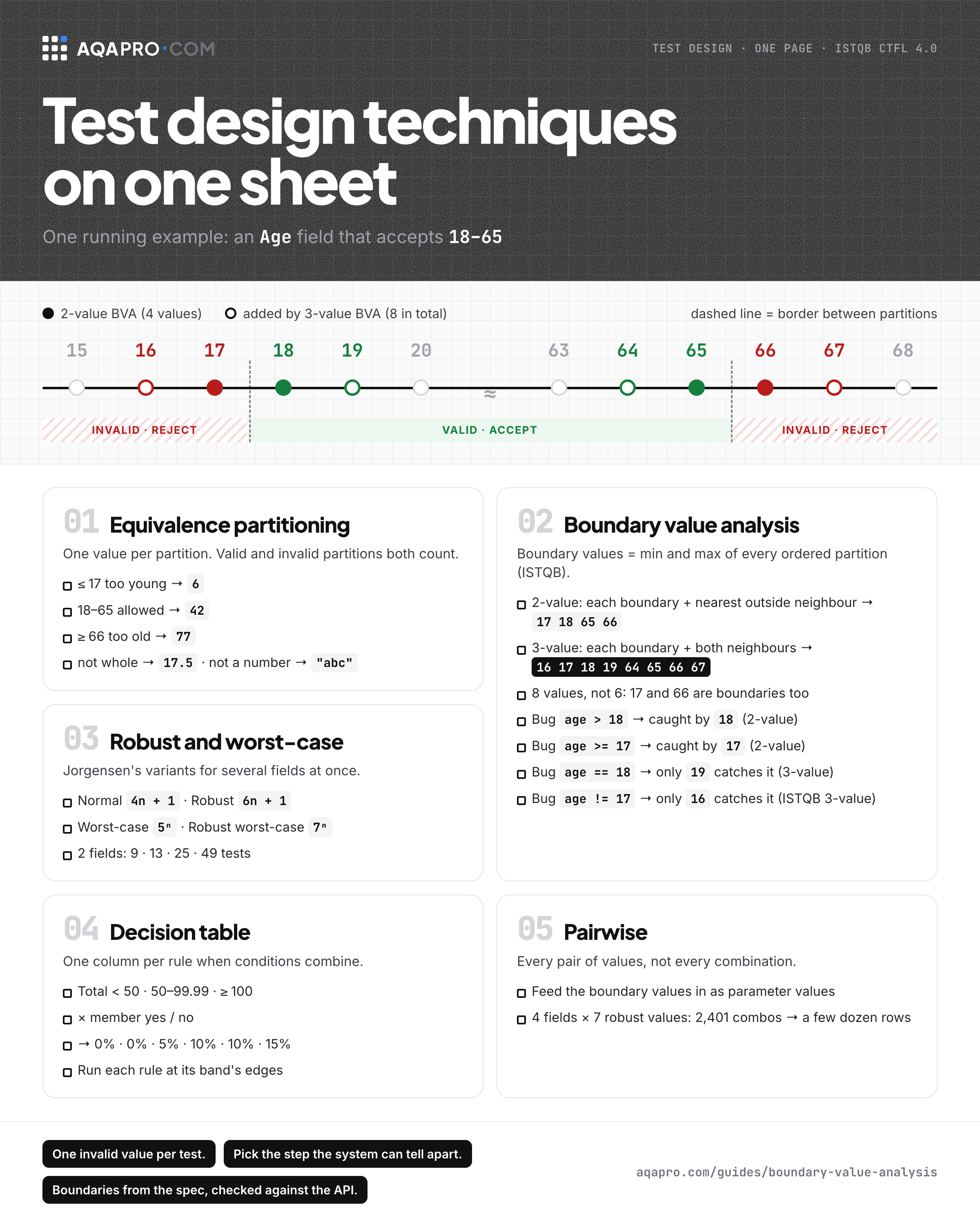
Test both sides of every border.
One invalid value per test. Boundaries from the spec, checked against the API.
FAQ
What is the difference between equivalence partitioning and boundary value analysis?
Equivalence partitioning picks one representative value from each partition, a group of inputs the system should treat the same way. Boundary value analysis tests the minimum and maximum of each ordered partition, where off-by-one bugs happen. Use them together: EP finds the partitions, BVA tests where they meet.
How many test cases does boundary value analysis produce?
For one valid range with an invalid partition on each side: 4 values with 2-value BVA (min − 1, min, max, max + 1) and 8 with ISTQB 3-value BVA, because each of those four boundary values gets both neighbours. Jorgensen's robust BVA gives 7: min − 1, min, min + 1, a nominal value, max − 1, max and max + 1.
Is 3-value boundary value analysis 6 or 8 values?
By the ISTQB CTFL 4.0 definition, 8 for a range like 18–65. Boundary values are the min and max of every partition, so 17 and 66 are boundary values too, and 3-value BVA adds both of their neighbours (16 and 67). The common six-value set min − 1, min, min + 1, max − 1, max, max + 1 counts only the edges of the valid range, so it leaves those two out.
What are the boundary values for 1 to 100?
2-value BVA: 0, 1, 100, 101. 3-value BVA by the ISTQB definition: −1, 0, 1, 2, 99, 100, 101, 102. If the domain can't go below zero, drop −1 and test 0 as the smallest possible value.
What is robust boundary value testing?
Robust BVA, from Paul Jorgensen's Software Testing: A Craftsman's Approach, extends normal BVA (min, min + 1, nominal, max − 1, max) with the invalid values just outside: min − 1 and max + 1. It checks that out-of-range input is rejected, not only that in-range input is accepted. For n independent fields it needs 6n + 1 tests.
Can boundary value analysis be used for strings and dates?
Yes, whenever the domain is ordered. For strings you test the length (step: one character), for dates the day (step: one day), for files the size (step: one byte). Enums and booleans have no order, so they get equivalence partitioning only.
Is boundary value analysis black-box or white-box testing?
Black-box. The boundaries come from the requirements, not from the code. ISTQB lists BVA with equivalence partitioning, decision tables and state transition testing as black-box test techniques.